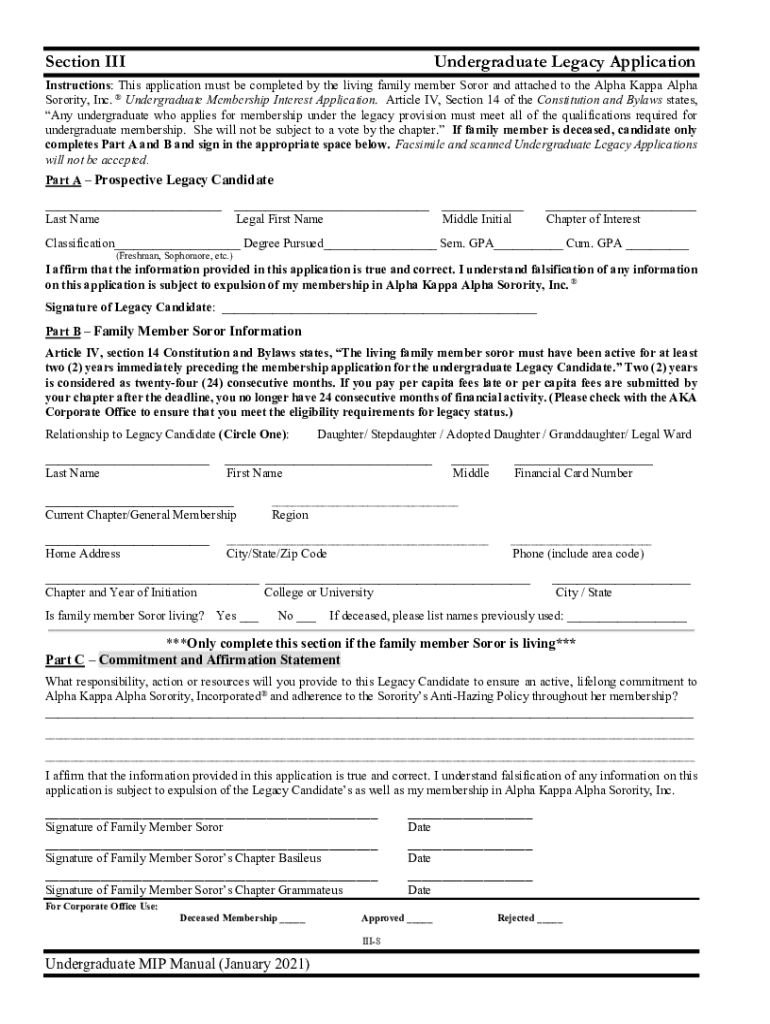
Section III Legacy Application Guidelines Guidelines for the completion and submission of the Undergraduate Legacy Application are specified below. Although an undergraduate chapter does not vote.
Loading

Open form follow the instructions

Easily sign the form with your finger

Send filled & signed form or save
How to fill out the Undergraduate MIP Manual online
This guide provides detailed instructions on how to effectively complete the Undergraduate MIP Manual online, specifically focusing on the Undergraduate Legacy Application. Following these steps will ensure that you accurately fill out the form and submit it correctly.
Follow the steps to successfully complete and submit the Undergraduate Legacy Application.
- Click ‘Get Form’ button to obtain the form and open it in the editor.
- Begin by completing the top section of the Undergraduate Legacy Application, which requires your last name, legal first name, middle initial, chapter of interest, classification, degree pursued, semester GPA, and cumulative GPA.
- Affirm the accuracy of the information provided by signing in the designated area on Part A of the application.
- Turn to Part B and enter the family member soror's information, including their relationship to you, their last name, first name, current chapter, home address, financial card number, and contact details.
- Confirm that the family member soror is living by selecting 'Yes' or 'No,' and provide any previously used names if applicable.
- In Part C, provide a commitment and affirmation statement detailing how the family member soror will support your active membership in the organization.
- Both the legacy candidate and the family member soror must sign the application, and if applicable, the signatures of the chapter Basileus and Grammateus must also be included.
- Ensure that all required documents, including your official transcript and additional forms, are ready to accompany your completed application for submission.
- Once everything is filled out, save changes to the form, and prepare to download, print, or share it as required for submission.
Complete your Undergraduate Legacy Application online today to ensure a smooth submission process.
Experience a faster way to fill out and sign forms on the web. Access the most extensive library of templates available.
Related content
Apr 26, 2019 — Materials Innovation Platforms (MIP) is a mid-scale infrastructure...
The Sorority's undergraduate Membership Intake Process (MIP) begins when an Official...
plus manual functions) per day on Series 1100/80 systems. ... 30-50% faster in a system...
Get answers to your most pressing questions about US Legal Forms API.
How do I file a complaint with Tdot?
Motorists may dial 1-877-SmartWay to record comments or email TDOT.Comments@tn.gov to send written comments. Those who provide contact information (street address, email, or phone number) will receive a response within seven days.
Does Tennessee pay for pothole damage?
Pothole Repair If drivers hit a pothole and experience damage to their vehicle, they may submit a damage claim. Claims are investigated on a case-by-case basis through the Tennessee Department of Treasury.
How do I file a pothole claim in RI?
Click on the link above to report a pothole on a State road, or call us at 401-222-2450 weekdays from 8:30 a.m. to 4 p.m. If you spot a pothole outside these hours, please call 401-222-2378.
Does Michigan cover pothole damage?
Be advised that the majority of damage claims are denied under governmental immunity laws, MCL 691.1402 and MCL 691.1403. Highway defect claims (including potholes) should only be submitted to MDOT if damage occurred on a state trunkline (M, I or US route), not local or county roads.
How do I file a pothole damage claim in NJ?
Please visit their website or call Tel.: 609-965-6060. The Pothole/Road Hazard Claim Form (RM-3) needs to be filled out. For incidents on local or county road, please call the respective township/county or visit their website.
Where do I claim for pothole damage?
The claims process is different for each province but if you are in Gauteng you can submit your completed claim form with applicable supporting documents to claims@jra.org.za or contact 011 491-5734/ 011 298 5168.
How do I report to Tdot?
PHONE REPORTING Call the TDOT Integrity Line at 615-253-5305 or Toll Free 1-855-801-0137. When reporting by phone, please provide the following information: nature of the incident. name or names of individuals involved.
How do I file a tort claim in Tennessee?
To file a claim, visit treasury.tn.gov/Tort-Liability. Evidence that the state could have repaired the dangerous road condition prior to your incident and neglected to do so.
Use professional pre-built templates to fill in and sign documents online faster. Get access to thousands of forms.
If you believe that this page should be taken down, please follow our DMCA take down process here.