Loading
Get Saint Leo University Professional Recommendation Form 2012-2026
How it works
-

Open form follow the instructions
-

Easily sign the form with your finger
-

Send filled & signed form or save
How to fill out the Saint Leo University Professional Recommendation Form online
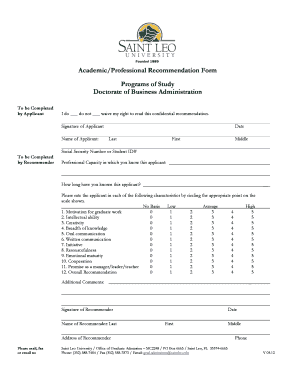
Filling out the Saint Leo University Professional Recommendation Form is a critical step in the application process for prospective graduate students. This guide provides clear instructions to help you complete the form accurately and efficiently online.
Follow the steps to successfully complete the recommendation form online.
- Press the ‘Get Form’ button to access the Professional Recommendation Form and open it in your online editor.
- Begin by completing the section designated for the applicant. Indicate whether you waive your right to read the confidential recommendation by checking the appropriate box.
- Input your name in the fields provided, including your last name, first name, and middle name.
- Enter your Social Security Number or Student ID number as required.
- Next, the recommender should fill in their professional capacity and duration of acquaintance with the applicant.
- The recommender will rate the applicant on various characteristics. Circle the number that reflects the applicant's abilities in each category, from motivation to overall recommendation.
- In the additional comments section, the recommender can provide further insights about the applicant that are relevant to the recommendation.
- Finally, both the applicant and recommender must provide their signatures, names, and dates.
- Save the completed document. Options to download, print, or share the form are available upon completion.
Complete the Saint Leo University Professional Recommendation Form online today!
If a husband or wife dies without a will and they have a surviving spouse and children together, the surviving spouse inherits the decedent's half of the couple's community property and one-third of the decedent's separate property.