Loading
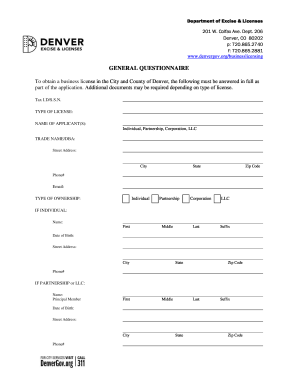
Get Co General Questionnaire - Denver 2014-2026
How it works
-

Open form follow the instructions
-

Easily sign the form with your finger
-

Send filled & signed form or save
How to fill out the CO General Questionnaire - Denver online
Completing the CO General Questionnaire is an essential step in obtaining a business license in Denver. This guide provides clear, step-by-step instructions to help you navigate the online form effectively.
Follow the steps to complete your application with ease.
- Press the ‘Get Form’ button to access the questionnaire and open it in your preferred document editor.
- Begin by entering your tax identification number or social security number in the designated field.
- In the 'Type of License' section, select the appropriate license type from the options provided.
- Fill in the 'Name of Applicant(s)' field with the name of the individual, partnership, corporation, or LLC applying for the license.
- In the 'Trade Name/DBA' section, provide the name under which the business will operate.
- Complete your physical 'Street Address,' 'City,' 'State,' and 'Zip Code' to provide the location of the business.
- Enter your contact information, including your phone number and email address.
- Specify the 'Type of Ownership' from the options available (individual, partnership, corporation, LLC).
- If applying as an individual, provide your full name, date of birth, and physical address.
- For partnerships or LLCs, enter the principal member's details, including their name, date of birth, and address.
- If applying as a corporation, include the relevant officer, shareholder, or director's details.
- Consider the ‘Responsible Party’ section, and fill in the manager or director's name and contact details.
- If applicable, complete the 'Agent for Service' section with the required information.
- Answer the conviction question truthfully—indicate yes or no and provide details if necessary.
- If vehicle details are required for the license, fill in the make, VIN, and license plate information.
- Sign the 'Oath of Applicant' section, affirming that all information provided is accurate, and fill in your title and date.
- If additional space is needed, attach extra sheets to provide complete information about all partners, members, and officers.
- Once all fields are completed, save your changes, download a copy for your records, and prepare to submit the form online.
Complete your CO General Questionnaire online today to start your business licensing process!
Essentially, the Board of Permits and Inspections or Building and Zoning Board knows what the homeowner permit is for once a plan is submitted by a builder. Once fees are paid, permits are issued. Later, the agency will have the construction inspected to make sure it passes code.”