Loading
Form preview
  • US Legal Forms
  • Form Library
  • More Forms
  • More Multi-State Forms
  • Motion For Continuance - Juvenile Matters

Get Motion For Continuance - Juvenile Matters

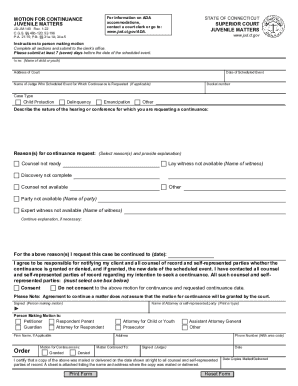
For information on ADA accommodations, contact a court clerk or go to: www.jud.ct.gov/ADA. MOTION FOR CONTINUANCE JUVENILE MATTERS JD-JM-140 Rev. 1-22 C.G.S. 46b-120; 52-196 P.A. 21-15; P.B.

How it works

  1. Open form

    Open form follow the instructions

  2. Easily sign form

    Easily sign the form with your finger

  3. Share form

    Send filled & signed form or save

How to fill out the MOTION FOR CONTINUANCE - JUVENILE MATTERS online

Filing a motion for continuance in juvenile matters can be a critical step in ensuring that all parties involved have adequate time to prepare. This guide will provide a clear, step-by-step approach to help you fill out the MOTION FOR CONTINUANCE form efficiently and accurately online.

Follow the steps to fill out the motion for continuance form effectively.

  1. Click the ‘Get Form’ button to obtain the form and open it in your preferred document editor.
  2. Begin by providing the full name of the child or youth involved in the case in the section labeled 'In re: (Name of child or youth)'. This identifies the subject of the motion.
  3. Input the address of the court overseeing the juvenile matters in the designated field. This is important for ensuring proper jurisdiction.
  4. Fill in the date of the scheduled event for which you are requesting the continuance. Ensure this is accurate to avoid confusion.
  5. Enter the docket number associated with the case. This number is essential for tracking and reference.
  6. In the section for 'Name of Judge Who Scheduled Event for Which Continuance is Requested', include the judge's name if applicable.
  7. Select the case type by checking the appropriate box — options include Child Protection, Delinquency, Emancipation, or Other.
  8. Describe the nature of the hearing or conference for which you are requesting a continuance in the given field. This provides context for your request.
  9. Select the reason(s) for your continuance request and provide any necessary explanations. Options include 'Counsel not ready', 'Lay witness not available', 'Discovery not complete', 'Counsel not available', 'Other', and ensure all relevant parties are noted.
  10. Specify the new date you wish for the case to be continued to in the section 'For the above reason(s) I request this case be continued to (date)'.
  11. Acknowledge your responsibility for notifying your client and all counsel of record regarding the outcome of the motion by checking the appropriate box about consent from all parties.
  12. Fill in the name of the attorney or self-represented party initiating the motion, ensuring the name is printed or typed clearly.
  13. Sign in the area designated 'Signed (Person making motion)' confirming your request.
  14. Indicate your role in the case (Petitioner, Guardian, Respondent, etc.) by selecting the corresponding box.
  15. Complete your address and contact information in the appropriate sections.
  16. After the judge reviews your application, their decision will be indicated in the section 'Motion for Continuance is: Granted/Dennis', and the new date for the hearing will be listed.
  17. Ensure that you certify a copy was mailed or delivered to all parties involved, noting the date of mailing or delivery. Attach a sheet listing the recipients.
  18. Finally, save your changes, download the completed document, and print it for submission.

Begin completing your motion for continuance online now to ensure a smooth process.

Get form

Experience a faster way to fill out and sign forms on the web. Access the most extensive library of templates available.
Get form

Related content

Florida Rules of Juvenile Procedure
court may: (A) order such party to comply with the discovery or inspection of materials...
Learn more
Motion for a Continuance
Some typical grounds for a continuance motion include the unavailability of a witness;...
Learn more
Senate Bill No. 1021 CHAPTER 41 An act to amend...
Jun 27, 2012 — This bill would specify that the Department of Corrections and...
Learn more

Related links form

Parent Ambassador Application & Job Description - Parent & Family ... VWR International Order Form - University Of Arkansas Abstract Evaluation Form Summary Of Educational Experience Form - University Of Arkansas - Iao Uark

Questions & Answers

Get answers to your most pressing questions about US Legal Forms API.

Contact support

Texas is one of the few states that is a “deed of trust” state. While many people take out a mortgage to purchase real estate, which is a loan borrowed from a bank to finance the purchase of a home, in most states, there are only two parties named on this legal document – the lender (bank) and the borrower (homeowner).

A promissory note is a key piece of a home loan application and mortgage agreement, ensuring that a borrower agrees to be indebted to a lender for loan repayment. Ultimately, it serves as a necessary piece of the legal puzzle that helps guarantee that sums are repaid in full and in a timely fashion.

A deed of trust is a legal agreement that's similar to a mortgage, which is used in real estate transactions. Whereas a mortgage only involves the lender and a borrower, a deed of trust adds a neutral third party that holds rights to the real estate until the loan is paid or the borrower defaults.

The three players involved in a deed of trust are: The “trustor,” also known as the borrower. The “trustee,” typically a title company with the power of sale, legal title to the real property, and the ability to hold a nonjudicial foreclosure. The “beneficiary,” also known as the lender.

Deeds of trusts are frequently used in Texas in real estate transactions to create an agreement such as a mortgage.

The promissory note is the promise to repay the loan funds to the lender. The deed of trust secures the house and land to the note and allows a lender to foreclose on a property if there is default. The most common default is failure to make the payments under the promissory note.

With a deed of trust, the lender gives the borrower the funds to make the purchase. The borrower provides the lender with a promissory note. The promissory note outlines the terms of the loan and the borrower's promise to pay. At this point, the borrower transfers the real property interest to the trustee.

Beneficiary/Payee: --Deed of Trust lien becomes barred 4 years after original/extended maturity date of the secured obligation [TEX. CIVIL PRACTICE & REMEDIES CODE §16.035].

There are a variety of deeds that are recognized in Texas, but the four most common deeds seen are general warranty deeds, special warranty deeds, no warranty deeds, and quitclaims. If you need a deed drafted or have any questions regarding these deeds or any other real property conveyance tools, please contact us.

Texas is a title theory state, where a lender holds the title to a borrower's property in a Deed of Trust.

Get This Form Now!

Use professional pre-built templates to fill in and sign documents online faster. Get access to thousands of forms.
Get form
If you believe that this page should be taken down, please follow our DMCA take down processhere.
Get MOTION FOR CONTINUANCE - JUVENILE MATTERS
Get form
  • Adoption
  • Bankruptcy
  • Contractors
  • Divorce
  • Home Sales
  • Employment
  • Identity Theft
  • Incorporation
  • Landlord Tenant
  • Living Trust
  • Name Change
  • Personal Planning
  • Small Business
  • Wills & Estates
  • Packages A-Z
  • Affidavits
  • Bankruptcy
  • Bill of Sale
  • Corporate - LLC
  • Divorce
  • Employment
  • Identity Theft
  • Internet Technology
  • Landlord Tenant
  • Living Wills
  • Name Change
  • Power of Attorney
  • Real Estate
  • Small Estates
  • Wills
  • All Forms
  • Forms A-Z
  • Form Library
  • Legal Hub
  • About Us
  • Help Portal
  • Legal Resources
  • Blog
  • Affiliates
  • Contact Us
  • Delete My Account
  • Site Map
  • Industries
  • Forms in Spanish
  • Localized Forms
  • State-specific Forms
  • Forms Kit
  • Real Estate Handbook
  • All Guides
  • Notarize
  • Incorporation services
  • For Consumers
  • For Small Business
  • For Attorneys
  • USLegal
  • FormsPass
  • pdfFiller
  • signNow
  • altaFlow
  • DocHub
  • Instapage
Form Packages
  • Adoption
  • Bankruptcy
  • Contractors
  • Divorce
  • Home Sales
  • Employment
  • Identity Theft
  • Incorporation
  • Landlord Tenant
  • Living Trust
  • Name Change
  • Personal Planning
  • Small Business
  • Wills & Estates
  • Packages A-Z
Form Categories
  • Affidavits
  • Bankruptcy
  • Bill of Sale
  • Corporate - LLC
  • Divorce
  • Employment
  • Identity Theft
  • Internet Technology
  • Landlord Tenant
  • Living Wills
  • Name Change
  • Power of Attorney
  • Real Estate
  • Small Estates
  • Wills
  • All Forms
  • Forms A-Z
  • Form Library
Customer Service
  • Legal Hub
  • About Us
  • Help Portal
  • Legal Resources
  • Blog
  • Affiliates
  • Contact Us
  • Delete My Account
  • Site Map
  • Industries
  • Forms in Spanish
  • Localized Forms
  • State-specific Forms
  • Forms Kit
Legal Guides
  • Real Estate Handbook
  • All Guides
Prepared for you
  • Notarize
  • Incorporation services
Our Customers
  • For Consumers
  • For Small Business
  • For Attorneys
Our Sites
  • USLegal
  • FormsPass
  • pdfFiller
  • signNow
  • altaFlow
  • DocHub
  • Instapage
Social Media
Call us now toll free:
+1 833 426 79 33
As seen in:
© Copyright 1999-2026 airSlate Legal Forms, Inc. 3720 Flowood Dr, Flowood, Mississippi 39232
  • Your Privacy Choices
  • Terms of Service
  • Privacy Notice
  • Content Takedown Policy
  • Bug Bounty Program