Loading
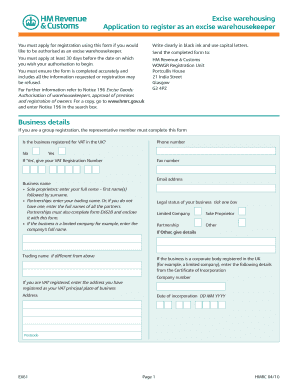
Get Ex61 - Excise Warehousing. Application To Register As An Excise ...
How it works
-

Open form follow the instructions
-

Easily sign the form with your finger
-

Send filled & signed form or save
How to fill out the EX61 - Excise Warehousing. Application To Register As An Excise ... online
Filling out the EX61 form is a crucial step for individuals or organizations looking to register as an excise warehousekeeper. This guide will provide you with detailed, step-by-step instructions to help you complete the application accurately and efficiently.
Follow the steps to successfully complete the application form.
- Click the ‘Get Form’ button to obtain the form and open it for editing.
- Begin by filling out the business details section. Indicate whether your business is registered for VAT in the UK by selecting either 'Yes' or 'No.' If you selected 'Yes,' provide your VAT registration number.
- Enter your business name. Sole proprietors should write their full name, partnerships should enter the trading name or the full names of all partners, and limited companies must enter their registered name.
- Select the legal status of your business by ticking the appropriate box. Options include 'Limited Company,' 'Sole Proprietor,' 'Partnership,' or 'Other.' If you choose 'Other,' provide further details.
- For corporate entities, enter the company number as indicated on the Certificate of Incorporation. Additionally, provide the registered VAT principal place of business address if applicable.
- Proceed to the warehouse details section. List all excise warehouses you own, providing a warehouse name, contact details, and email address for each. If necessary, continue on form EX61A.
- In the declaration section, confirm that the information provided is accurate by filling in your full name, the date, and signing the form. Specify the capacity in which you are signing.
- Once all sections have been completed accurately, review the form for any missing information or mistakes. You must ensure that you submit the application at least 30 days before your desired authorization start date.
- After successful completion, you can save the changes, download, print, or share the EX61 form as required.
Complete your registration application online today to ensure timely processing.
Footnotes are notes indicated in your text with numbers and placed at the bottom of the page. They're used to provide: Citations (e.g., in Chicago notes and bibliography) Additional information that would disrupt the flow of the main text.