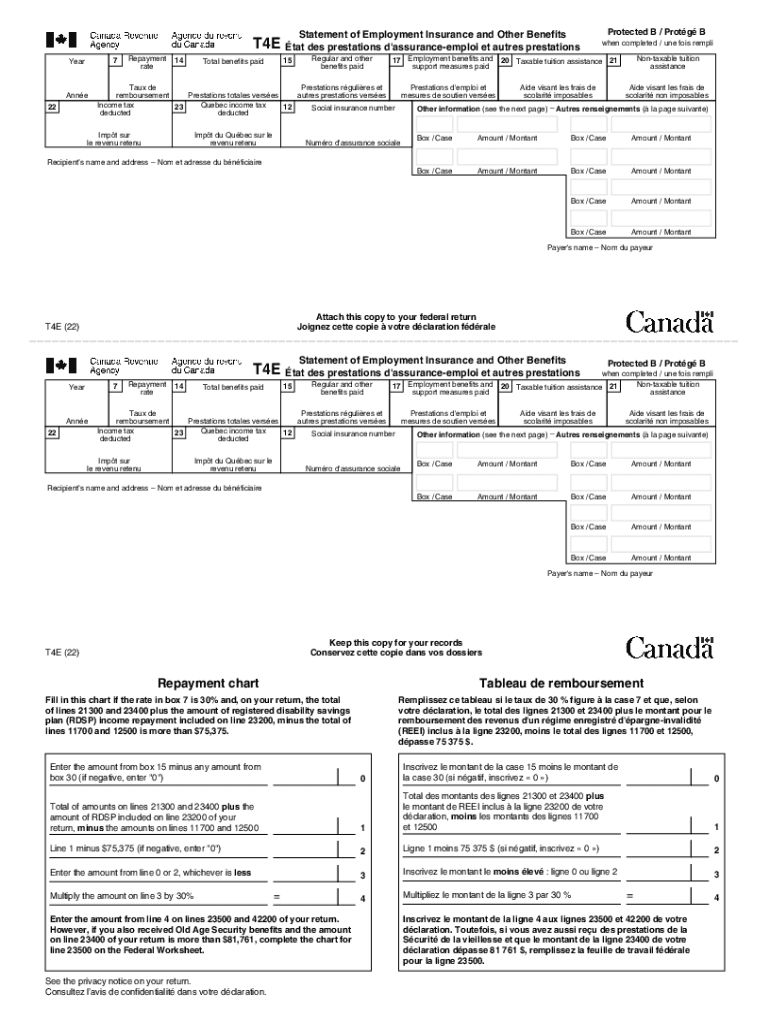
Protected B / Protg BStatement of Employment Insurance and Other BenefitsT4E tat des prestations d'assuranceemploi et autres prestations 7YearAnne 22Repayment rate1415Total benefits paidRegular and.
Loading

Open form follow the instructions

Easily sign the form with your finger

Send filled & signed form or save
How to fill out the Canada T4E online
The Canada T4E form is crucial for reporting employment insurance and other benefits received during the tax year. This guide provides a clear, step-by-step approach to completing this document online, ensuring you meet your reporting obligations accurately and efficiently.
Follow the steps to fill out the Canada T4E form online.
- Click the ‘Get Form’ button to obtain the form and open it in your editor.
- Begin by entering the year at the top of the form corresponding to your benefits. This is typically the current tax year.
- Input your social insurance number in the designated box to verify your identity.
- Enter your name and address in the provided fields to ensure the form is correctly attributed to you.
- In Box 14, report the total amount of regular benefits paid to you, including any amount that may have been earned in the previous year but paid during the current year.
- Fill in Box 15 with work-sharing benefits or income benefits received under the Employment Insurance Act.
- Report any employment benefits and support measures in Box 17, ensuring these amounts are not included in previous boxes.
- Complete the tuition assistance sections (Boxes 20 and 21) according to the benefits you received, referring to Form T2202 if needed.
- Ensure that any federal and provincial income tax amounts withheld are recorded in Boxes 22 and 23 respectively.
- Finally, review your entries for accuracy. You may then save your changes, download a copy, print it, or share it as necessary.
Complete your Canada T4E form online today to ensure a smooth tax filing process!
Experience a faster way to fill out and sign forms on the web. Access the most extensive library of templates available.
Related content
General Instructions · Election To Claim the Foreign Tax Credit Without Filing Form 1116...
The Student Accounts Office will provide Canadian tax forms to students that are Canadian...
Mar 7, 2017 — Pdf Printable Canadian Tax Checklist ... To make sure you get every tax...
Get answers to your most pressing questions about US Legal Forms API.
When must T4 be issued in Canada?
Fill out and file all T4 slips and the T4 Summary using electronic filing methods, or on paper, within: 30 days from the date your business stops. 90 days from the date a partner or the sole proprietor dies.
What is the difference between T1 and T4?
The T1 is a form filled out by employees and business owners, then submitted to the CRA. The T4 form, on the other hand, is filled out by employers and distributed to employees.
How long does it take to get T4?
Employers have until the end of February each year to issue their employees' T4 slips for the preceding tax year. Your employer may provide you with a paper copy, either directly or in the mail. Or, they may issue you your T4 electronically, via email or through their online payroll portal.
When should I get my T4 in Canada?
Slips are prepared by your employer, payer, administrator or financial institution. You should receive most of your slips (including your T4, T4A, and T5 slips) and receipts by the end of February.
Does everyone get a T4 in Canada?
Who gets a T4 slip? If you are employed by a Canadian company, you'll receive a T4 slip. You will need to use it to file your taxes. The business you work for will also send a copy of the T4 slip to the Canadian Revenue Agency, or CRA.
What is the difference between T4 and T4E Canada?
If you received any COVID-19 benefits from the Canada Revenue Agency (CRA), you will get a T4A slip. For details: T4A: Report COVID-19 amounts. If you are a Quebec resident, you will get a T4E(Q) slip.
What is a T4E Canada?
Definition of a T4E T4Es are for 1 calendar year, from January 1 to December 31. You must file this slip with your income tax return for that tax year. The T4E indicates: the gross amount of benefits paid. the income tax deducted.
How do I get my T4 in Canada?
How to access your tax slips in MSCA go to “Tax information” select “Tax slips” from the drop-down menu, select the year of the tax slip you want to access. select “View” – a hyperlink to the tax slip will be displayed. select the hyperlink to access your tax slip.
Use professional pre-built templates to fill in and sign documents online faster. Get access to thousands of forms.
If you believe that this page should be taken down, please follow our DMCA take down process here.