Loading
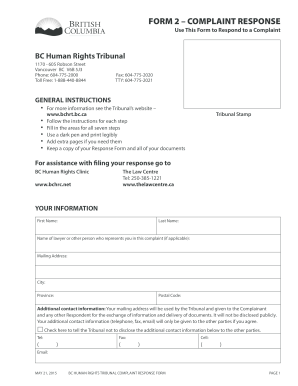
Get Canada Bc Human Rights Tribunal Complaint Response 2015
How it works
-

Open form follow the instructions
-

Easily sign the form with your finger
-

Send filled & signed form or save
How to fill out the Canada BC Human Rights Tribunal Complaint Response online
This guide provides clear and detailed instructions for users who need to complete the Canada BC Human Rights Tribunal Complaint Response form online. It aims to simplify the form-filling process, ensuring that all necessary information is captured accurately and effectively.
Follow the steps to fill out the complaint response form accurately.
- Click ‘Get Form’ button to obtain the Complaint Response form and open it for completion.
- In 'Your Information', provide your first name, last name, mailing address, city, province, and postal code. If you have a lawyer or another representative, include their name. Your additional contact information can be provided here, but you may choose to keep it confidential by checking the appropriate box.
- Name the Complainant(s) by printing their name as it appears on the complaint form. Also, include the Tribunal Case Number, which can be found in the letter notifying you of the complaint.
- Name the Respondent(s). Include all involved and correct any misspellings from the complaint form. If one of the Respondents is submitting a separate response, do not list them on this form.
- If you are acting on behalf of another, provide your authority in STEP 3. Confirm your role, whether you are a lawyer or an authorized representative, such as a designated member of the board.
- Move to Part A, where you respond to the facts alleged in the complaint. State clearly which facts you agree or disagree with and provide your version of events.
- Complete Part B if applicable, justifying the Respondent's conduct or providing other defenses to the complaint. Be specific about the actions taken that led to the complaint.
- Indicate if there are other related proceedings. If there is, answer the corresponding questions regarding those proceedings.
- In STEP 6, confirm the total number of pages you are attaching to the response form. Tick the box to verify that your information is true and accurate.
- Decide if you would like to submit a dismissal application. If yes, ensure it is attached to your response form.
- Once all sections are completed, save changes, download, print, or share your response form as needed.
Start filling out your complaint response form online today to ensure your voice is heard.
Get form
Experience a faster way to fill out and sign forms on the web. Access the most extensive library of templates available.
Get This Form Now!
Use professional pre-built templates to fill in and sign documents online faster. Get access to thousands of forms.