Loading
Get Tx Provider Information Change Form 2018-2026
How it works
-

Open form follow the instructions
-

Easily sign the form with your finger
-

Send filled & signed form or save
How to fill out the TX Provider Information Change Form online
The TX Provider Information Change Form is essential for Texas Medicaid and State Health-Care Program providers to update their enrollment information. This guide provides clear, step-by-step instructions to assist users in completing the form online with ease.
Follow the steps to fill out the TX Provider Information Change Form online.
- Click ‘Get Form’ button to access the TX Provider Information Change Form and open it in your browser.
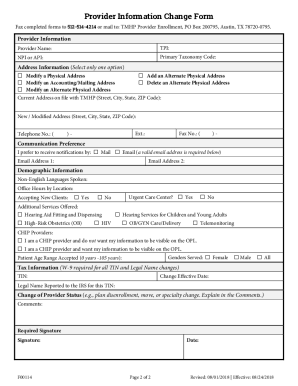
- Begin by filling in the provider information section. Provide your name, either your nine-digit Texas Provider Identifier (TPI) or National Provider Identifier (NPI) / Atypical Provider Identifier (API), and your primary taxonomy code. Ensure this information is complete to avoid delays.
- Next, proceed to the address information section. You can select one option to modify your physical address, add an alternate physical address, modify your mailing address, or delete an alternate physical address. Fill in the current address on file with TMHP and provide the new or modified address details.
- In the communication preferences section, indicate how you would like to receive notifications. You may choose either mail or email, ensuring to include valid email addresses if you select email communications.
- Complete the demographic information section. Indicate any non-English languages spoken, office hours, and whether you are accepting new clients or are an urgent care center. Additionally, note any special services offered.
- Fill in the tax information section with your Federal Tax Identification Number (TIN) if applicable. Note that a W-9 form is required for TIN changes or legal name changes.
- In the comments section, explain any changes in provider status, such as disenrollment or moves, that are relevant.
- Finally, provide your signature and the date at the required signature section. Remember, only the provider’s signature is necessary for individual changes, while an authorized representative may sign for group or facility changes.
- After completing the form, you can save the changes, download a copy for your records, print the form, or share it as needed.
Start completing your TX Provider Information Change Form online today to ensure your information is up to date.