Loading
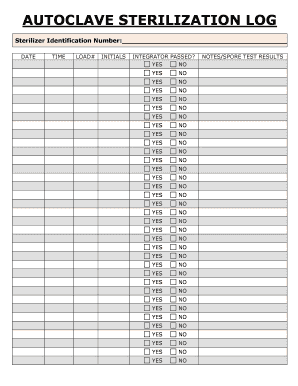
Get Or Autoclave Sterilization Log_dsa
How it works
-

Open form follow the instructions
-

Easily sign the form with your finger
-

Send filled & signed form or save
How to use or fill out the OR Autoclave Sterilization Log_DSA online
The OR Autoclave Sterilization Log_DSA is an essential document for tracking and verifying the sterilization process of surgical instruments. This guide will help users complete the log accurately and efficiently, ensuring compliance with safety and health standards.
Follow the steps to complete the sterilization log online.
- Click ‘Get Form’ button to obtain the form and open it in the editor.
- Enter the sterilizer identification number in the designated field, ensuring that it corresponds to the correct sterilization device used during the process.
- Select the date of sterilization from the calendar function, ensuring the accuracy of the information provided.
- Record the time the sterilization process began in the appropriate field, using the correct format (hour and minute).
- Input the load number, which identifies the specific batch of instruments being sterilized. This number should be unique to each load.
- Initial the log next to your entry to indicate completion and verification of the information provided in the previous fields.
- For each sterilization cycle, indicate whether the integrator passed by selecting 'Yes' or 'No' in the corresponding fields. Ensure each entry reflects the outcome of the test accurately.
- In the 'Notes/SPORE Test Results' section, provide any additional comments or results from spore testing, if applicable. This should include details that may affect future sterilization processes.
- Once all fields in the sterilization log have been filled out, review the information for completeness and accuracy.
- Save your changes, and if necessary, download, print, or share the completed form as needed.
Complete your sterilization logs online today for efficient document management and compliance.
Your handwritten “holographic” will does not need to be signed in front of witnesses or a notary.