Loading
Form preview
  • US Legal Forms
  • Other Templates
  • More Forms
  • More Multi-State Forms
  • Must Be Completed For Medicare Recipients

Get Must Be Completed For Medicare Recipients

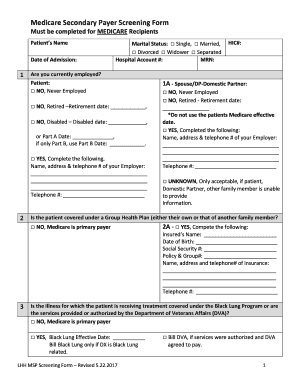
Medicare Secondary Payer Screening Form Must be completed for MEDICARE Recipients Patients Name Date of Admission:1Marital Status: Single, Married, Divorced Widower Separated Hospital Account #: MAN:Are.

How it works

  1. Open form

    Open form follow the instructions

  2. Easily sign form

    Easily sign the form with your finger

  3. Share form

    Send filled & signed form or save

How to fill out the Must Be Completed For MEDICARE Recipients online

Completing the Must Be Completed For MEDICARE Recipients form can be essential for ensuring that all necessary information is accurately recorded for your Medicare services. This guide will help you navigate the process step-by-step, making it simpler for you to provide the required details.

Follow the steps to complete the Medicare form online efficiently.

  1. Press the ‘Get Form’ button to access the form and open it in your browser.
  2. Begin filling out the form by entering the patient's name and date of admission, then proceed to indicate the marital status and provide the hospital account number and MRN.
  3. Indicate the current employment status for the patient by selecting one of the following options: Never Employed, Retired, Disabled, or Yes (if employed). Fill in the employer's name, address, and telephone number if applicable.
  4. Complete the HIC# section. Follow the instructions for the spouse or domestic partner, reading the prompts carefully to provide accurate employment status information.
  5. Indicate whether the patient is covered under a Group Health Plan. If yes, fill in the insured’s details, including their name, date of birth, Social Security number, policy number, and contact details for the insurance provider.
  6. Answer the questions related to whether the illness is covered under specific programs like the Black Lung Program or services authorized by the Department of Veterans Affairs. If applicable, provide details such as effective dates.
  7. Provide information regarding any accidents, injuries, or third-party liabilities related to the patient's treatment, as well as any additional forms required for each situation.
  8. Specify the reason for Medicare entitlement by selecting from the provided options (Age, Disability, Solely ESRD, or ESRD Age or Disabled), and follow through with the subsequent questions for each category.
  9. Fill in the personal information for both the patient and any hospital representatives completing the form, ensuring all sections are thoroughly filled out.
  10. Once all fields are accurately completed, review the form for any potential errors or missing information. After final checks, save your changes, download the form, print it, or share it as needed.

Make sure to complete your documents online for a seamless experience.

Get form

Experience a faster way to fill out and sign forms on the web. Access the most extensive library of templates available.
Get form

Related content

This form is used to advise Medicare of the person...
Your letter will revoke your authorization and Medicare will no longer give out your...
Learn more
Medicare Enrollment for Physicians, Non- ...
Physicians, non-physician practitioners, and other health care suppliers must enroll in...
Learn more
Medicare
determine program payment must complete Form-CMS-2552-10 with a valid Office of Management...
Learn more

Related links form

Form 497 Up 2 Oklahoma Egg Law Request For Issuance Of An Inactive Associate License - State Of ... - State Ok Request For Issuance Of An Inactive Broker License - State Ok

Questions & Answers

Get answers to your most pressing questions about US Legal Forms API.

Contact support

Owning a property's “mineral rights” refers to ownership of the mineral deposits under the surface of a piece of land. The rights to the minerals usually belong to the owner of the surface property, or surface estate. In Texas, though, those rights can be transferred to another party.

While both surface and mineral rights are generally conveyed when the landowner acquires the land, it is far more common for the seller to retain mineral rights than surface rights (or for prior sellers in the chain of title of the property to have retained the mineral rights).

Enacted in 1919, the Relinquishment Act, as interpreted by the Courts, reserves all minerals to the State in those lands sold with a mineral classification between September 1, 1895 and June 29, 1931.

75.101. PRESUMPTION OF ABANDONMENT. (a) All mineral proceeds that are held or owing by the holder and that have remained unclaimed by the owner for longer than three years after they became payable or distributable and the owner's underlying right to receive those mineral proceeds are presumed abandoned.

Usually, the owner of the surface estate owns the mineral rights under the property. However, under Texas law, those rights can be sold or leased to another party.

But, if after 10 years the mineral rights are not being exploited (there is no oil and gas exploration or production), then the mineral rights revert to the new surface owner.

Call the county where the minerals are located and ask how to transfer mineral ownership after death....They will probably require the following: Copy of the Death Certificate. Copy of the recorded will (or Affidavit of Heirship if there was no will) Probate documents. Completed W9 Form with the new owners' information.

Get This Form Now!

Use professional pre-built templates to fill in and sign documents online faster. Get access to thousands of forms.
Get form
If you believe that this page should be taken down, please follow our DMCA take down processhere.
Get Must Be Completed For MEDICARE Recipients
Get form
  • Adoption
  • Bankruptcy
  • Contractors
  • Divorce
  • Home Sales
  • Employment
  • Identity Theft
  • Incorporation
  • Landlord Tenant
  • Living Trust
  • Name Change
  • Personal Planning
  • Small Business
  • Wills & Estates
  • Packages A-Z
  • Affidavits
  • Bankruptcy
  • Bill of Sale
  • Corporate - LLC
  • Divorce
  • Employment
  • Identity Theft
  • Internet Technology
  • Landlord Tenant
  • Living Wills
  • Name Change
  • Power of Attorney
  • Real Estate
  • Small Estates
  • Wills
  • All Forms
  • Forms A-Z
  • Other Templates
  • Legal Hub
  • About Us
  • Help Portal
  • Legal Resources
  • Blog
  • Affiliates
  • Contact Us
  • Delete My Account
  • Site Map
  • Industries
  • Forms in Spanish
  • Localized Forms
  • State-specific Forms
  • Forms Kit
  • Real Estate Handbook
  • All Guides
  • Notarize
  • Incorporation services
  • For Consumers
  • For Small Business
  • For Attorneys
  • USLegal
  • FormsPass
  • pdfFiller
  • signNow
  • altaFlow
  • DocHub
  • Instapage
Form Packages
  • Adoption
  • Bankruptcy
  • Contractors
  • Divorce
  • Home Sales
  • Employment
  • Identity Theft
  • Incorporation
  • Landlord Tenant
  • Living Trust
  • Name Change
  • Personal Planning
  • Small Business
  • Wills & Estates
  • Packages A-Z
Form Categories
  • Affidavits
  • Bankruptcy
  • Bill of Sale
  • Corporate - LLC
  • Divorce
  • Employment
  • Identity Theft
  • Internet Technology
  • Landlord Tenant
  • Living Wills
  • Name Change
  • Power of Attorney
  • Real Estate
  • Small Estates
  • Wills
  • All Forms
  • Forms A-Z
  • Other Templates
Customer Service
  • Legal Hub
  • About Us
  • Help Portal
  • Legal Resources
  • Blog
  • Affiliates
  • Contact Us
  • Delete My Account
  • Site Map
  • Industries
  • Forms in Spanish
  • Localized Forms
  • State-specific Forms
  • Forms Kit
Legal Guides
  • Real Estate Handbook
  • All Guides
Prepared for you
  • Notarize
  • Incorporation services
Our Customers
  • For Consumers
  • For Small Business
  • For Attorneys
Our Sites
  • USLegal
  • FormsPass
  • pdfFiller
  • signNow
  • altaFlow
  • DocHub
  • Instapage
Social Media
Call us now toll free:
+1 833 426 79 33
As seen in:
© Copyright 1999-2026 airSlate Legal Forms, Inc. 17 Station Street, Ste. 203, Brookline, MA 02445
  • Your Privacy Choices
  • Terms of Service
  • Privacy Notice
  • Content Takedown Policy
  • Bug Bounty Program