Loading
Get Canada T2151 E 2020
How it works
-

Open form follow the instructions
-

Easily sign the form with your finger
-

Send filled & signed form or save
How to fill out the Canada T2151 E online
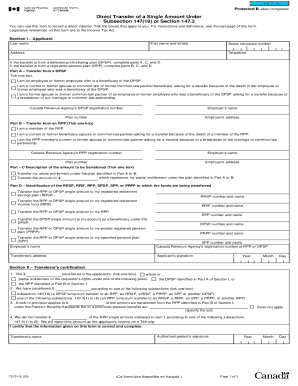
This guide provides clear, step-by-step instructions to assist users in completing the Canada T2151 E form online. By following these guidelines, individuals can ensure an accurate and efficient filing process for the direct transfer of a single amount.
Follow the steps to successfully complete the form.
- Press the ‘Get Form’ button to access the Canada T2151 E form and open it in your editor.
- In Section I – Applicant, enter your first name, initials, last name, social insurance number, telephone number, and address. Ensure that your personal details are accurate as they are essential for processing.
- Indicate whether the transfer is from a deferred profit-sharing plan (DPSP) or a registered pension plan (RPP) by completing either Part A or Part B as applicable. Tick the appropriate box regarding your status as a beneficiary.
- In Part A, if the transfer is from a DPSP, select how you are related to the employee or former employee and fill in the required details including the Canada Revenue Agency's registration number, employer's name, plan number, and employer's address.
- If the transfer is from an RPP, complete Part B by indicating your relationship to the member of the RPP and filling out the required details, similar to Part A.
- In Part C, describe the amount to be transferred by ticking the appropriate box and specifying the amount if partial entitlement is selected.
- Complete Part D by specifying the type of account to which the funds are being transferred. Fill in the relevant account number and name for the selected plan type.
- In Section II – Transferor's certification, the transferor must confirm the details of the transfer and provide the relevant amounts. This section must be signed and dated appropriately.
- Section III – Transferee's certification should be filled out by the transferee, confirming receipt of the amount indicated. This section also requires a signature and date.
- Finally, review all information for accuracy. Save your changes, download, print, or share the completed form as needed.
Complete your Canada T2151 E form online today for a seamless transfer process.
Get form
Experience a faster way to fill out and sign forms on the web. Access the most extensive library of templates available.
Get This Form Now!
Use professional pre-built templates to fill in and sign documents online faster. Get access to thousands of forms.