Loading
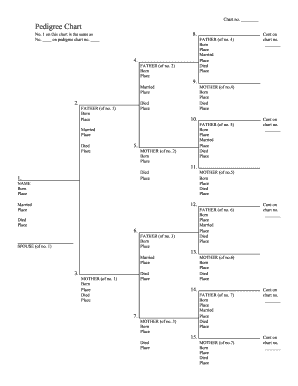
Get Ar Pedigree Chart - Hot Spring County 2015-2026
How it works
-

Open form follow the instructions
-

Easily sign the form with your finger
-

Send filled & signed form or save
How to fill out the AR Pedigree Chart - Hot Spring County online
This guide provides step-by-step instructions on how to accurately complete the AR Pedigree Chart for Hot Spring County online. By following these directions, users will be able to easily navigate through each section of the form.
Follow the steps to complete the form correctly.
- Click ‘Get Form’ button to access the AR Pedigree Chart. This will enable you to open the form in your preferred editing tool.
- Begin by filling out the first section of the chart, which may require you to write down the names and details of individuals. For each person, include the fields: Name, Born (date), Place of birth, Married (date), Place of marriage, Died (date), and Place of death.
- Continue to populate the chart by identifying the relationships between the individuals listed. Make sure to fill out all father and mother fields as required, ensuring accuracy in their corresponding entries.
- If you encounter space limitations or require additional information, note the instruction 'Cont on chart no. _______' to continue on a separate page. Ensure you maintain the correct numbering to keep the family lineage clear.
- Once you have filled in all necessary fields for each individual, review the information for completeness and accuracy. Check that all dates and places are correct and clearly written.
- Finally, save your changes. You may have options to download, print, or share the completed form as needed. Ensure you keep a copy for your records before submitting it as required.
Start filling out your AR Pedigree Chart online to ensure your family history is well-documented.
Prescribed Form for Release of Lien (Form VTR-266)