Loading
Get Directv Residential Smatv New Customer Information Form 2007-2026
How it works
-

Open form follow the instructions
-

Easily sign the form with your finger
-

Send filled & signed form or save
How to fill out the DIRECTV Residential SMATV New Customer Information Form online
Completing the DIRECTV Residential SMATV New Customer Information Form online is an essential step for new customers establishing service. This guide provides clear and supportive instructions for filling out the form accurately to ensure a smooth process.
Follow the steps to complete the form online effectively.
- Click ‘Get Form’ button to access the form and open it in an editor.
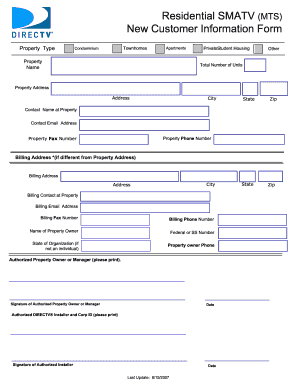
- Begin by selecting the property type from the options provided: Townhomes, Condominium, Apartments, Private Student Housing, or Other.
- Enter the total number of units in the designated field.
- Provide the property address, including Street Address, City, State, and Zip Code.
- Fill in the contact name at the property, followed by their email address, phone number, and fax number.
- If the billing address is different from the property address, fill in the billing address including Street Address, City, State, and Zip Code.
- Provide the billing contact name, their email address, phone number, and fax number.
- Enter the name of the property owner and their Federal or Social Security Number.
- If the property owner is not an individual, include the state of organization.
- Fill in the property owner’s phone number.
- Print the name of the authorized property owner or manager, followed by their signature and the date.
- Print the name of the authorized DIRECTV installer and Corp ID, followed by their signature and the date.
- Once all the fields are completed, users can save changes, download, print, or share the form as needed.
Take the next step and complete your form online today.