Loading
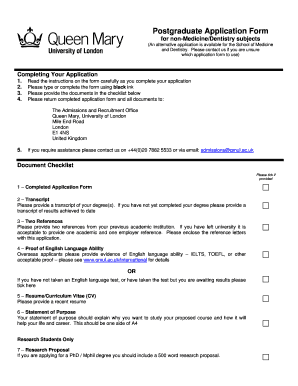
Get Admission Form In Qmul
How it works
-

Open form follow the instructions
-

Easily sign the form with your finger
-

Send filled & signed form or save
How to fill out the Admission Form In Qmul online
Completing the Admission Form In Qmul online is a straightforward process that requires careful attention to detail. Follow this guide to ensure that you fill out each section correctly and submit all necessary documents.
Follow the steps to successfully complete your application.
- Press the ‘Get Form’ button to obtain the Admission Form and open it in your editor.
- Begin by reading the instructions provided on the form thoroughly, as they will guide you on how to fill it out correctly.
- Complete the personal details section, including your name, nationality, date of birth, and contact information. Ensure that the information matches your official documents.
- In the course details section, specify your intended program of study. You may apply for two taught programmes or one taught and one research programme.
- For previous education, list all institutions attended starting with the most recent. Include the title of the degree, institution location, dates of study, results, and date of qualification.
- Provide information regarding your employment history, including job title, employer details, dates, and a brief description of duties.
- Fill out the finance section by detailing your residential history for the past four years and how you intend to finance your studies.
- Complete the disability section if applicable, sharing any special requirements you may have.
- If you have previously attended Queen Mary, provide the necessary details in the designated section.
- Read and sign the declaration to affirm that all information provided is accurate. Include the date of signing.
- After completing the form, review it for any errors. Save your changes, and then download or print the completed Admission Form.
- Lastly, gather all required documents from the checklist and submit them along with your completed application form.
Start filling out your Admission Form In Qmul online today!
To contact the Enrolment office at QMUL, locate their email address on the university's website. In your email, clearly state your purpose and provide any necessary information related to your Admission Form In Qmul. This will help the staff assist you more effectively. The Enrolment team is there to guide you through the process, so do not hesitate to reach out.