Loading
Get Bethesda Hospital Admissions
How it works
-

Open form follow the instructions
-

Easily sign the form with your finger
-

Send filled & signed form or save
How to fill out the Bethesda Hospital Admissions online
Filling out the Bethesda Hospital Admissions form online is a crucial step for ensuring a smooth admission process. This guide provides clear and comprehensive instructions tailored to your needs, enabling you to complete the form with confidence.
Follow the steps to successfully complete the admissions form.
- Press the ‘Get Form’ button to acquire the necessary form and open it in your digital workspace.
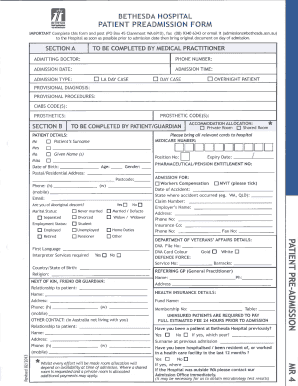
- Begin with Section A, where your admitting doctor will fill in their details, including name, phone number, admission date, and admission type.
- In Section B, input patient details, ensuring that you provide accurate information such as Medicare number, name, date of birth, age, gender, and postal address. Don’t forget to check and include all relevant insurance and DVA details.
- Continue filling out relevant medical history, including allergies, previous operations, any serious illnesses, and current medications. Be sure to list all medications with their dosages and frequency.
- Move on to consent sections, where you acknowledge understanding and agree to the procedures and terms listed. Fill in the necessary information related to consent, if applicable.
- After completing all sections, review the entries thoroughly for accuracy and completeness.
- Finally, once satisfied with the information, you can save your changes, and choose to download, print, or share the completed form as required.
Complete your Bethesda Hospital Admissions form online today and ensure your smooth admission!
Get form
Experience a faster way to fill out and sign forms on the web. Access the most extensive library of templates available.
With two not-for-profit hospitals, 401-bed Bethesda Hospital East and 80-bed Bethesda Hospital West, Bethesda Health is comprised of more than 675 physicians and 2,500 employees.
Get This Form Now!
Use professional pre-built templates to fill in and sign documents online faster. Get access to thousands of forms.