Loading
Get Shipping Bill
How it works
-

Open form follow the instructions
-

Easily sign the form with your finger
-

Send filled & signed form or save
How to fill out the Shipping Bill online
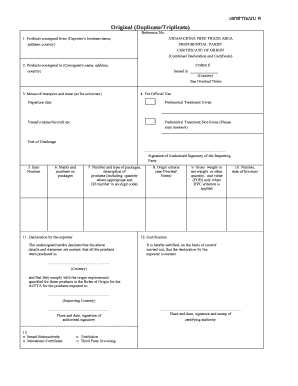
Filling out the Shipping Bill online is a crucial step in ensuring compliance with international trade regulations. This guide will assist you in understanding each component of the form, allowing you to complete it accurately and efficiently.
Follow the steps to successfully complete the Shipping Bill online.
- Click ‘Get Form’ button to access the Shipping Bill and open it in the editor.
- Enter the exporter's business name, address, and country in the 'Products consigned from' section. Ensure accurate details to avoid processing delays.
- Fill in the consignee's name, address, and country in the 'Products consigned to' section. This identifies the recipient of the shipment.
- Specify the means of transport and route in the relevant section, providing information on how the goods will be shipped.
- Indicate the departure date and enter the vessel's name or aircraft details in the appropriate fields.
- In the item number field, list the item numbers associated with each product in your shipment.
- Record the marks and numbers on packages to ensure proper identification during transit.
- In the packages section, detail the number and type of packages and provide a description of the products, including quantity and HS number.
- Indicate the origin criteria that apply to each product, referencing the guidelines provided in the overleaf notes.
- Fill in the gross weight, net weight, or other relevant quantity, and value (FOB) if applicable, based on the RVC criterion.
- Document the invoice numbers and dates for the products as required.
- Complete the declaration by the exporter, affirming that all information is accurate and that the products meet origin requirements.
- After filling out the necessary sections, review your entries for accuracy, then save changes, download the document, print it, or share it as necessary.
Complete your Shipping Bill online to streamline your export process!
An Exporter can also file the shipping bill by himself, by registering on the IEC (Import Export Code) and ADC (Authorised Dealer Code). You simply need to submit the e-form with all the scanned copies of the documents for filing the bill of shipping.