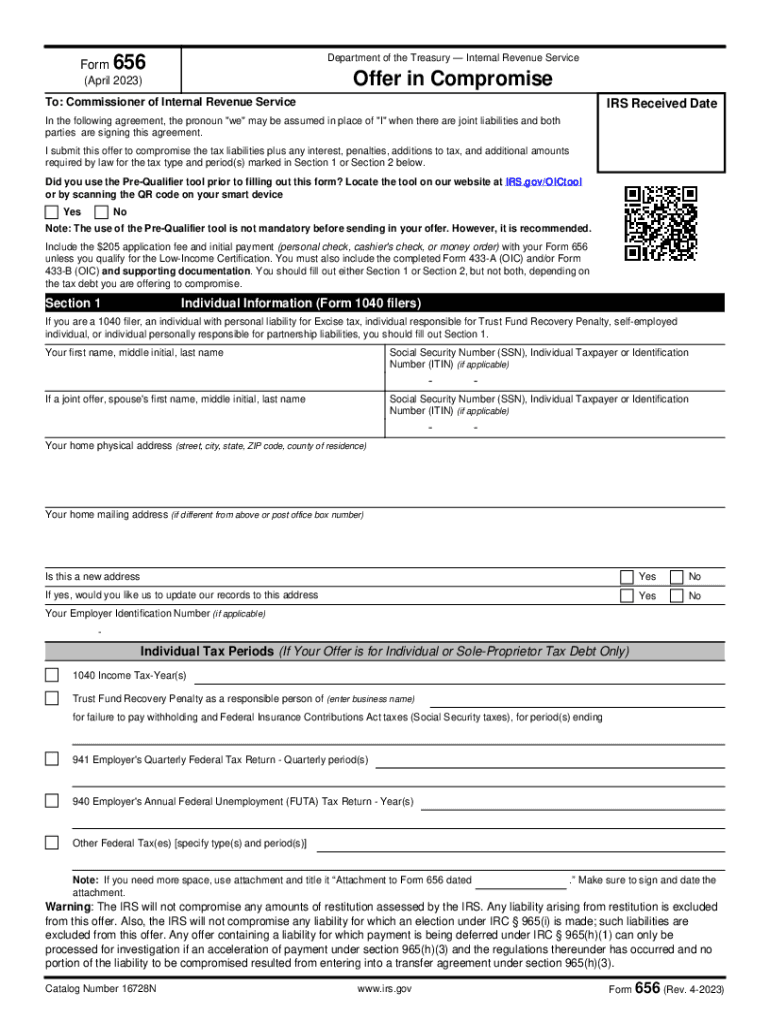
Hich may be found under the Forms and Pubs tab on www.irs.gov. Completed financial statements and required application fee and initial payment must be included with your Form 656. Failure to include the required information will delay consideration of your offer. Form Department of the Treasury Internal Revenue Service 656 Offer in Compromise (April 2023) To: Commissioner of Internal Revenue Service IRS Received Date In the following agreement, the pronoun "we" may be assumed in plac.
Loading

Open form follow the instructions

Easily sign the form with your finger

Send filled & signed form or save
How to fill out the IRS 656 online
The IRS Form 656 is a critical document for individuals or businesses seeking to settle tax liabilities through an offer in compromise. This guide will provide you with a clear and structured approach to filling out the IRS 656 online.
Follow the steps to complete your IRS 656 offer in compromise.
- Press the ‘Get Form’ button to access the necessary form and open it in an editing interface.
- Complete the required information in the sections designated for either individual or business tax debt. Ensure you are filling out Section 1 for individuals or Section 2 for businesses.
- Provide your personal details in Section 1, including your name, Social Security Number, and address. If applicable, also fill in your partner’s details if it is a joint offer.
- Specify the tax periods and types of taxes you are including in your offer. If needed, attach a separate document titled ‘Attachment to Form 656’ to provide additional details.
- Indicate if you qualify for Low-Income Certification in Section 1. If you do, ensure you check the appropriate box and omit any application fee or payments.
- In Section 3, clearly state the reason for your offer by selecting the relevant option and providing any necessary explanations or documentation.
- Select your preferred payment terms in Section 4, choosing whether you will make a lump sum payment or periodic payments. Fill in the necessary amounts according to your chosen method.
- Designate how you want your payments to be applied in Section 5, indicating the specific tax years and debts, if necessary.
- In Section 6, outline the source of funds for your payment, ensuring you include all required documentation.
- Review and ensure all sections are completed accurately before signing in Section 8. Confirm that all signatures are gathered and that the document is dated.
- Once all fields are completed, save your changes. You may also opt to download, print, or share the form as needed.
Now that you know the stages of filling out the IRS 656 online, start preparing your documents for submission.
Experience a faster way to fill out and sign forms on the web. Access the most extensive library of templates available.
Related content
The offer program provides eligible taxpayers with a path toward paying off their tax...
2023 Income Tax Forms · 2022 Income Tax Forms - Current Year ... When you complete Form...
Form 656 B (Rev. 3 2017) F656b · 1 Notice of Federal Tax Lien A lien is a legal claim...
Get answers to your most pressing questions about US Legal Forms API.
Does the IRS forgive tax debt after 10 years?
Yes, after 10 years, the IRS forgives tax debt. After this time period, the tax debt is considered "uncollectible". However, it is important to note that there are certain circumstances, such as bankruptcy or certain collection activities, which may extend the statute of limitations.
How much should I offer the IRS in an offer in compromise?
There are 2 basic Offer in Compromise formulas: On a 5-month repayment plan: (Available Monthly Income x 12) + Value of Personal Assets. On a 24-month repayment plan: (Available Monthly Income x 24) + Value of Personal Assets.
What is form 656 economic hardship?
Form 656 provides a way to reach an agreement with the IRS that you'll pay less than what you owe. Form 656, the "offer in compromise" (OIC), gives the IRS an overview of your financial situation so it can review your debt and your ability to pay.
Who can file Form 656?
If you and your spouse or ex-spouse have a joint tax debt and your spouse or ex- spouse does not want to be part of the offer, you may submit a Form 656 to compromise your responsibility for the joint tax debt.
Is there a one time tax forgiveness?
One-time forgiveness, otherwise known as penalty abatement, is an IRS program that waives any penalties facing taxpayers who have made an error in filing an income tax return or paying on time. This program isn't for you if you're notoriously late on filing taxes or have multiple unresolved penalties.
How much will the IRS usually settle for?
How much will the IRS settle for? The IRS will typically only settle for what it deems you can feasibly pay. To determine this, it will take into account your assets (home, car, etc.), your income, your monthly expenses (rent, utilities, child care, etc.), your savings, and more.
Who qualifies for the IRS forgiveness program?
To be eligible, you must claim extreme financial hardship and have filed all previous tax returns. The program is available to certain people only, so be sure to check if you qualify. This program allows you to consolidate all of your debts into one monthly payment, making it easier to manage.
What is a IRS form 656?
Use Form 656 when applying for an Offer in Compromise (OIC), which is an agreement between you and the IRS that settles your tax liabilities for less than the full amount that you owe.
Use professional pre-built templates to fill in and sign documents online faster. Get access to thousands of forms.
If you believe that this page should be taken down, please follow our DMCA take down process here.
This form is available in several versions. Select the version you need from the drop-down list below.