Loading
Get Posti Power Of Attorney
How it works
-

Open form follow the instructions
-

Easily sign the form with your finger
-

Send filled & signed form or save
How to fill out the Posti Power Of Attorney online
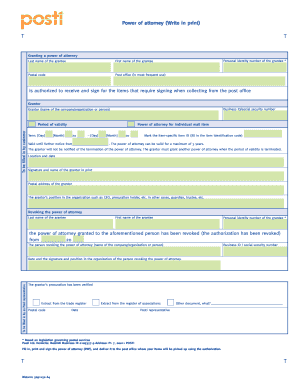
Filling out the Posti Power Of Attorney online allows users to authorize another person to collect items requiring a signature from the post office. This guide provides step-by-step instructions to ensure the form is completed accurately and efficiently.
Follow the steps to complete the Posti Power Of Attorney form online.
- Click ‘Get Form’ button to acquire the form and open it for online completion.
- In the first section, provide the last name, first name, and personal identity number of the grantee (the individual being authorized). Additionally, enter the postal code where the grantee resides and the name of their most frequently used post office.
- Next, fill in the details of the grantor. This includes their name (either a person or organization), business ID or social security number, and postal address.
- Specify the period of validity for the power of attorney. You need to provide the start date and term, including day and month. The authorization can be valid for a maximum of three years, or until further notice.
- If applicable, enter the specific item ID related to the mail item that the grantee is authorized to collect.
- Proceed to sign and date the document at the designated location, ensuring to print your name clearly and specify your position in the organization, if relevant.
- Finally, review the completed form for accuracy. Once satisfied, save the changes, and choose to download, print, or share the form as needed.
Complete your documents online with confidence today!
Choose the right size for your item and pay for the Exchange Locker (starting from EUR 2.90). Write down the Helposti code. Pack the item and mark your own contact details on the parcel. Take the parcel to a Posti Parcel Locker with a screen in the middle.