Loading
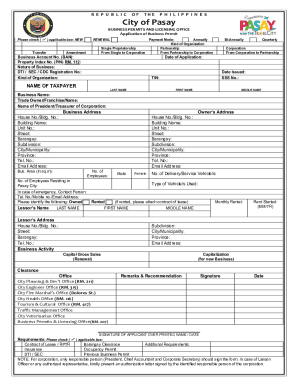
Get Ph Application Of Business Permit - City Of Pasay 2016
How it works
-

Open form follow the instructions
-

Easily sign the form with your finger
-

Send filled & signed form or save
How to fill out the PH Application Of Business Permit - City Of Pasay online
The PH Application of Business Permit is essential for operating a business legally in the City of Pasay. This guide will walk you through the process of completing this application form online, ensuring you understand each component required for a successful submission.
Follow the steps to complete your application smoothly.
- Click ‘Get Form’ button to obtain the form and open it in the editor.
- Determine the type of application you are submitting by checking the applicable box: New, Transfer, Renewal, or Amendment.
- Select the payment mode from the options provided: Annually, Bi-Annually, or Quarterly.
- Indicate your kind of organization by selecting from the options: Single Proprietorship, Partnership, Corporation, and any transitions such as from Single to Corporation.
- Fill in the Business Account Number (BAN) and Property Index Number (PIN), along with the nature of your business.
- Provide your DTI/SEC/CDC registration number and specify the date of application.
- Input personal information under 'Name of Taxpayer': enter last name, first name, and middle name.
- State the business name and trade owner/franchise name, followed by the name of the president or treasurer of the corporation if applicable.
- Detail your business address and the owner's address, ensuring to fill in house/building numbers, street names, barangay, subdivision, city, province, telephone number, and email address.
- Specify the business area in square meters, number of employees categorized by gender, and details about delivery or service vehicles.
- In case of emergency, provide a contact person’s details, including their telephone number, mobile number, and email address.
- Indicate whether your business space is owned or rented. If rented, attach the contract of lease and provide monthly rental information.
- Provide the lessor's name and address, and detail when the rent started (month/year).
- Fill out the sections regarding business activity, capital gross sales for renewal, and capitalization for new business.
- Review the related offices for clearance, then sign and date the application at the bottom.
- Attach any required documents such as the contract of lease, Barangay clearance, insurance, occupancy permit, DTI/SEC registration, and previous business permit.
- Once all fields are filled, save changes, then download, print, or share the completed form as necessary.
Complete your application online to ensure your business is compliant and ready to operate.
Get form
Experience a faster way to fill out and sign forms on the web. Access the most extensive library of templates available.
Log on to https://qceservices.quezoncity.gov.ph/ and submit the accomplished form online together with the necessary supporting documents, depending on your application type. Should the application require additional supporting documents, personnel from the concerned Ancillary office will contact the applicant.
Get This Form Now!
Use professional pre-built templates to fill in and sign documents online faster. Get access to thousands of forms.
Industry-leading security and compliance
US Legal Forms protects your data by complying with industry-specific security standards.
-
In businnes since 199725+ years providing professional legal documents.
-
Accredited businessGuarantees that a business meets BBB accreditation standards in the US and Canada.
-
Secured by BraintreeValidated Level 1 PCI DSS compliant payment gateway that accepts most major credit and debit card brands from across the globe.