Loading
Form preview
  • US Legal Forms
  • Other Templates
  • More Forms
  • More Multi-State Forms
  • Uk Buckinghamshire Council Blue Badge Application 2020

Get Uk Buckinghamshire Council Blue Badge Application 2020

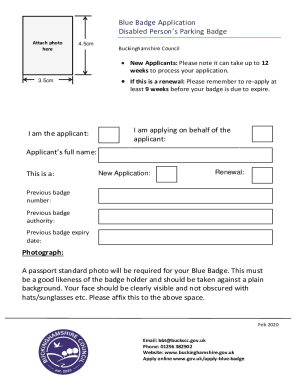
Cm If this is a renewal: Please remember to re-apply at least 9 weeks before your badge is due to expire. I am the applicant: I am applying on behalf of the applicant: Applicant s full name: This is a: New Application: Renewal: Previous badge number: Previous badge authority: Previous badge expiry date: Photograph: A passport standard photo will be required for your Blue Badge. This must be a good likeness of the badge holder and should be taken against a plain background. Your fac.

How it works

  1. Open form

    Open form follow the instructions

  2. Easily sign form

    Easily sign the form with your finger

  3. Share form

    Send filled & signed form or save

How to fill out the UK Buckinghamshire Council Blue Badge Application online

Applying for a Blue Badge can make a significant difference for individuals with mobility challenges. This guide provides clear and supportive instructions on how to complete the Buckinghamshire Council Blue Badge Application online, ensuring a smooth and efficient process.

Follow the steps to successfully complete the application

  1. Click ‘Get Form’ button to obtain the application form and open it for editing.
  2. Indicate whether you are the applicant or applying on behalf of someone else by selecting the appropriate option.
  3. Attach a passport-standard photograph of the applicant against a plain background in the designated area.
  4. In the section for reasons for applying, specify your eligibility by selecting the relevant automatic criteria or further assessment categories.
  5. Complete Section One by providing personal details including the applicant's title, first name, surname, date of birth, and National Insurance number.
  6. Fill out the contact details, including preferred method of communication (phone, email, or post). Also include current and previous addresses if needed.
  7. In Section Two, detail any walking difficulties by describing medical conditions and indicating the level of pain, breathlessness, and walking aids used.
  8. Complete Section Three if applicable, providing details on any non-visible (hidden) conditions that affect your journeys.
  9. If relevant, continue to Section Four and provide information regarding any disabilities that affect both arms.
  10. If applying on behalf of a child under three, complete Section Five with the child's relevant medical conditions and treatments.
  11. In Section Six, provide proof of identity and address with the required documentation as outlined.
  12. Fill Section Seven with any additional information or declarations pertinent to the application.
  13. Finally, review the information for completeness and accuracy, then proceed to pay for the badge as instructed in Section Eight.
  14. Submit the completed application by returning it to the specified address or email it, and keep a copy for your records.

Start your application today and assist users with mobility challenges by filling out the Blue Badge Application online.

Get form

Experience a faster way to fill out and sign forms on the web. Access the most extensive library of templates available.
Get form

Related content

Application for Disabled Person Permit - Florida...
Please Print/Type below. APPLICATION BY DISABLED PERSON (See Warning Below). I certify...
Learn more
Application for Disability Parking Certificate...
If no MN DL or ID please explain: Date of Birth. Full Name (Please Print) Last, First and...
Learn more
U.S. Department of Veterans Affairs: Graphic...
This document is the solely-approved standard graphic identity guide for VA, ... The VA...
Learn more

Related links form

50 Yard Zero De9c Sample Rental Application For Email Form Ps Form 3811 Word Template

Questions & Answers

Get answers to your most pressing questions about US Legal Forms API.

Contact support

Make sure you renew your Blue Badge at least four weeks before it expires. It is your responsibility to provide all necessary documentation so that you can renew your Blue Badge in time.

Parking with a blue badge in Sutton you can park on a single or double yellow line for up to 3 hours. except where there is a ban on loading or unloading. except in parts of central London where local schemes apply.

Your Blue Badge will be valid in York, whether it has been issued through City of York Council or another local authority elsewhere in the UK. When parking with your Blue Badge: your badge must be clearly on display. the badge holder must be in attendance.

It must be a taken in the last 12 months, clear and front facing picture of the applicant's full face. It is not acceptable to wear a hat or scarf. In the case of religious preferences, the scarf should not hide your face.

The permit is for any eligible disabled person whether you are travelling as a driver, or as a passenger. It allows you to park for free in some pay and display car parks and on single and double yellow lines in most streets for up to three hours.

The purpose of the form is to explain why you believe you are eligible for a Blue Badge. You will need to list the reasons that mean you find it difficult to move, what disabilities you have, the level of mobility that you have, and provide any associated medical documentation to support what you are saying.

How can I provide a photo? You can upload the photo with your application. If you are not able to upload your photograph when applying then you can email it to us via redbridge.blue.badge@northgateps.com. It must be a taken in the last 12 months, clear and front facing picture of the applicant's full face.

About the Blue Badge scheme severely sight impaired (registered blind) be unable to walk. individual receiving certain benefits (Disability Living Allowance (DLA) and, or Personal independent Payment) (PIP)) experience very considerable difficulty whilst walking, which may include psychological distress.

Using a smart phone: Open the camera on your phone and take the photo. If you already have a recent photo then go to the gallery or picture file on your camera where you usually view your photos.

Get This Form Now!

Use professional pre-built templates to fill in and sign documents online faster. Get access to thousands of forms.
Get form
If you believe that this page should be taken down, please follow our DMCA take down processhere.
Get UK Buckinghamshire Council Blue Badge Application
Get form
  • Adoption
  • Bankruptcy
  • Contractors
  • Divorce
  • Home Sales
  • Employment
  • Identity Theft
  • Incorporation
  • Landlord Tenant
  • Living Trust
  • Name Change
  • Personal Planning
  • Small Business
  • Wills & Estates
  • Packages A-Z
  • Affidavits
  • Bankruptcy
  • Bill of Sale
  • Corporate - LLC
  • Divorce
  • Employment
  • Identity Theft
  • Internet Technology
  • Landlord Tenant
  • Living Wills
  • Name Change
  • Power of Attorney
  • Real Estate
  • Small Estates
  • Wills
  • All Forms
  • Forms A-Z
  • Other Templates
  • Legal Hub
  • About Us
  • Help Portal
  • Legal Resources
  • Blog
  • Affiliates
  • Contact Us
  • Delete My Account
  • Site Map
  • Industries
  • Forms in Spanish
  • Localized Forms
  • State-specific Forms
  • Forms Kit
  • Real Estate Handbook
  • All Guides
  • Notarize
  • Incorporation services
  • For Consumers
  • For Small Business
  • For Attorneys
  • USLegal
  • FormsPass
  • pdfFiller
  • signNow
  • altaFlow
  • DocHub
  • Instapage
Form Packages
  • Adoption
  • Bankruptcy
  • Contractors
  • Divorce
  • Home Sales
  • Employment
  • Identity Theft
  • Incorporation
  • Landlord Tenant
  • Living Trust
  • Name Change
  • Personal Planning
  • Small Business
  • Wills & Estates
  • Packages A-Z
Form Categories
  • Affidavits
  • Bankruptcy
  • Bill of Sale
  • Corporate - LLC
  • Divorce
  • Employment
  • Identity Theft
  • Internet Technology
  • Landlord Tenant
  • Living Wills
  • Name Change
  • Power of Attorney
  • Real Estate
  • Small Estates
  • Wills
  • All Forms
  • Forms A-Z
  • Other Templates
Customer Service
  • Legal Hub
  • About Us
  • Help Portal
  • Legal Resources
  • Blog
  • Affiliates
  • Contact Us
  • Delete My Account
  • Site Map
  • Industries
  • Forms in Spanish
  • Localized Forms
  • State-specific Forms
  • Forms Kit
Legal Guides
  • Real Estate Handbook
  • All Guides
Prepared for you
  • Notarize
  • Incorporation services
Our Customers
  • For Consumers
  • For Small Business
  • For Attorneys
Our Sites
  • USLegal
  • FormsPass
  • pdfFiller
  • signNow
  • altaFlow
  • DocHub
  • Instapage
Social Media
Call us now toll free:
+1 833 426 79 33
As seen in:
© Copyright 1999-2026 airSlate Legal Forms, Inc. 17 Station Street, Ste. 203, Brookline, MA 02445
  • Your Privacy Choices
  • Terms of Service
  • Privacy Notice
  • Content Takedown Policy
  • Bug Bounty Program