Loading
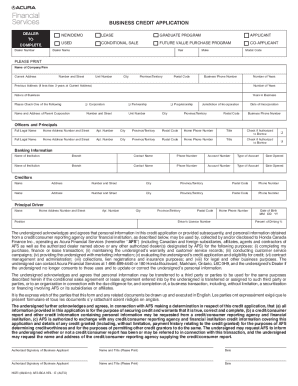
Get Canada Acura Afs Bca Ntl 2014-2026
How it works
-

Open form follow the instructions
-

Easily sign the form with your finger
-

Send filled & signed form or save
How to fill out the Canada Acura AFS BCA NTL online
Filling out the Canada Acura AFS BCA NTL form online is a straightforward process. This guide provides step-by-step instructions to assist users in completing the form accurately and efficiently.
Follow the steps to complete the application seamlessly.
- Click ‘Get Form’ button to obtain the form and open it in the editor.
- In the Dealer section, enter the Dealer Number and select the appropriate option for the vehicle type, such as New/Demo, Used, Lease, or Conditional Sale.
- Provide the Dealer Name and details for the Year, Make, and Model Code of the vehicle.
- In the Applicant section, fill out the Name of the Company or Firm along with the Current Address, ensuring to include the unit number, city, province/territory, and postal code.
- Enter the Business Phone Number and the number of years at the Current Address. If less than three years, also provide the Previous Address details.
- Indicate the Nature of Business and Years in Business, selecting the appropriate type such as Corporation, Partnership, or Proprietorship.
- If applicable, provide the Name and Address of the Parent Corporation, including its jurisdiction of incorporation and date of incorporation.
- Complete the Officers and Principals section with the full legal names, home addresses, contact information, titles, and indicate if they are authorized to borrow.
- In the Banking Information section, enter the details for two banking institutions, including the institution's name, branch, contact name, phone number, account number, type of account, and date opened.
- List out the Creditors by providing their names, addresses, phone numbers, and any relevant personal information if needed.
- Complete the Principal Driver section with the driver's full name, home address, position, driver's license number, and driving percentage.
- Review the terms regarding personal information usage and consent. Ensure all provided information is accurate.
- Conclude by signing the form where indicated and providing the names and titles of the authorized signatories along with the date.
- Once all sections are complete, save changes, download, print, or share the form as needed.
Start competing your documents online today to make the process easier.
How to build business credit Establish your business. ... Register your business with your secretary of state. ... Get your EIN. ... Open a business bank account. ... Continue building relationships with vendors. ... Use your business credit card. ... Pay early and often. ... Focus on credit utilization.