Loading
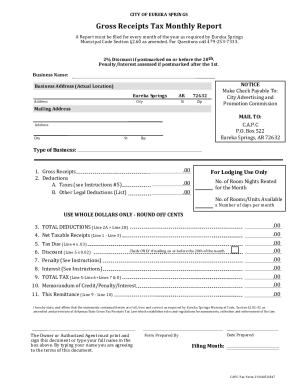
Get Pdf Gross Receipts Tax Monthly Report - The Eureka Springs Capc
How it works
-

Open form follow the instructions
-

Easily sign the form with your finger
-

Send filled & signed form or save
How to fill out the PDF Gross Receipts Tax Monthly Report - The Eureka Springs CAPC online
Filing the Gross Receipts Tax Monthly Report is essential for businesses in Eureka Springs. This guide provides clear instructions on how to effectively complete the form online, ensuring compliance with local regulations.
Follow the steps to fill out the Gross Receipts Tax Monthly Report online.
- Click ‘Get Form’ button to obtain the form and open it in the editor.
- Enter your business name in the designated field to ensure the report is linked to your entity.
- Provide your business address, including the street, city, state (AR), and zip code. Make sure to use your actual location.
- Fill in the mailing address section using the provided mailing details for C.A.P.C. to ensure proper delivery.
- Indicate your type of business in the appropriate field to categorize your operations.
- Report your gross receipts in the specified field, entering the total amount without cents.
- Detail any deductions under ‘Deductions’ with subsection A for taxes and subsection B for other legal deductions, if applicable.
- If you are in the lodging business, fill out the number of room nights rented and the number of rooms/units available for the month.
- Calculate total deductions by adding Line 2A and Line 2B, then report this amount.
- Determine your net taxable receipts by subtracting Line 3 from Line 1 and enter the result.
- Calculate the tax due by multiplying Line 4 by 0.03 and report this value.
- If applicable, calculate any potential discount by taking 2% of Line 5 and check the box if mailing on or before the 20th.
- If any penalties or interests are applicable, calculate these amounts and add them to the total tax due.
- Complete Line 9 with the total tax amount, factoring in any discounts, penalties, or interests.
- Affirm the accuracy of your statements in the required affirmation section and ensure that either the owner or authorized agent signs or types their name.
- Fill in the date prepared and the name of the person who prepared the form.
- Finally, save your changes and either download, print, or share the completed form as needed.
Complete your Gross Receipts Tax Monthly Report online today to stay compliant.
We are funded by the residents of, and visitors to, Eureka Springs, Arkansas through a 3% sales tax on all prepared food, beverages, and lodging.
Industry-leading security and compliance
US Legal Forms protects your data by complying with industry-specific security standards.
-
In businnes since 199725+ years providing professional legal documents.
-
Accredited businessGuarantees that a business meets BBB accreditation standards in the US and Canada.
-
Secured by BraintreeValidated Level 1 PCI DSS compliant payment gateway that accepts most major credit and debit card brands from across the globe.