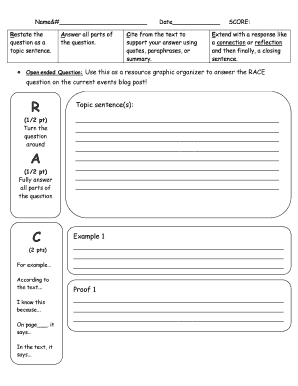
Ses, or summary. SCORE: Extend with a response like a connection or reflection and then finally, a closing sentence. Open ended Question: Use this as a resource graphic organizer to answer the RACE question on the current events blog post! R (1/2 pt) Turn the question around A (1/2 pt) Fully answer all parts of the question C (2 pts) For example According to the text... I know this because... On page , it says... In the text, it says... Topic sentence(s):.
Open form follow the instructions
Easily sign the form with your finger
Send filled & signed form or save
How to use or fill out the Use This As A Resource Graphic Organizer To Answer The online
This guide provides essential instructions for effectively completing the Use This As A Resource Graphic Organizer To Answer The. Designed for users at various experience levels, it breaks down each section of the organizer into manageable steps.
Follow the steps to successfully fill out the graphic organizer.
- Click ‘Get Form’ button to obtain the form and open it in the browser.
- Begin by restating the question as a topic sentence in the appropriate section. Ensure it captures the essence of the question clearly and concisely.
- Carefully answer all parts of the question. Review the question to ensure that your responses are comprehensive and address every component.
- Use the citation section to support your answer. Include direct quotes, paraphrases, or summaries from the text. Reference specific pages accurately to strengthen your response.
- Extend your answer with a thoughtful connection or reflection. Consider how the content relates to your understanding or experiences and write your observations in the designated area.
- Conclude by drafting a closing sentence that summarizes your answer, highlighting the main points made throughout your response.
- Upon completing the form, ensure all fields are filled correctly. Finally, save changes, download the document, and if necessary, print or share it with others.
Start completing your documents online for better organization and clarity.
Experience a faster way to fill out and sign forms on the web. Access the most extensive library of templates available.
Related content
by CS Doyle · 1999 · Cited by 51 — This study examined the effectiveness of two...
Classification table: Students can use this simple organizer to sort or classify...
By the end of 8th grade, students have a well- rounded tech toolkit that serves their...
Get answers to your most pressing questions about US Legal Forms API.
How do we use this graphic organizer?
Use Graphic Organizers at any point in the lesson to structure information into understandable chunks: When taking notes about new information in a lesson to organize ideas. After reading a book to organize the plot. When comparing and contrasting two concepts.
What is a graphic organizer answer?
What is a graphic organizer? Graphic organizers are visual thinking tools that make pictures of your thoughts. The pictures demonstrate relationships between facts, concepts, or ideas, and guide your thinking as you design the map or diagram.
How do you use a graphic organizer?
Use Graphic Organizers at any point in the lesson to structure information into understandable chunks: When taking notes about new information in a lesson to organize ideas. After reading a book to organize the plot. When comparing and contrasting two concepts.
How can students use a graphic organizer?
Graphic organizers can help students focus their thoughts for planning, decision making, and writing. They help students see connections, patterns, and relationships. They can also help students show understanding of the “big picture” from a lesson or book.
What are the 5 types of graphic organizer?
Choose the type of organizer that you want from the navigation above or scroll down to see each of the different types included, one by one. 1 Circle Map Graphic Organizer. ... 2 Spider Map Graphic Organizer. ... 3 Idea Wheel Graphic Organizer. ... 4 Idea Web Graphic Organizer. ... 5 Concept Map Graphic Organizer.
What graphic organizer should be used?
Type #1: Circle Map Graphic Organizer. Type #2: Spider Map Graphic Organizer. Type #3: Idea Wheel Graphic Organizer. Type #4: Idea Web Graphic Organizer.
What is graphic organizer and its uses?
A graphic organizer is a robust visual learning tool that helps teachers organize their students' ideas. Educators can use graphic organizers to present complex concepts through interactive visuals. Students and teachers can use graphic organizers to brainstorm ideas and make hard decisions.
What are 4 examples of graphic organizer?
Four examples of graphic organizers: outline, Venn diagram, hierarchical organizer, and bubble map.
Use professional pre-built templates to fill in and sign documents online faster. Get access to thousands of forms.
If you believe that this page should be taken down, please follow our DMCA take down process here.