Loading
Get Fl Rodeway Inn And Suites Credit Card Authorization 2009-2026
How it works
-

Open form follow the instructions
-

Easily sign the form with your finger
-

Send filled & signed form or save
How to fill out the FL Rodeway Inn And Suites Credit Card Authorization online
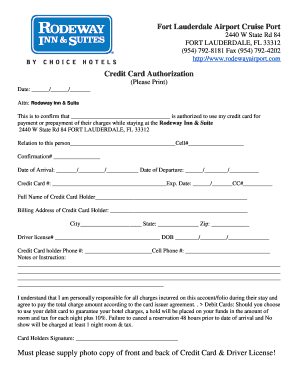
Filling out the FL Rodeway Inn And Suites Credit Card Authorization form is a crucial step for users wishing to authorize payment during their stay. This guide will provide clear, step-by-step instructions to ensure the process is seamless and straightforward.
Follow the steps to complete the authorization form online.
- Click ‘Get Form’ button to acquire the form and open it in the editing interface.
- Begin by entering the date in the specified format (MM/DD/YYYY) at the top of the form. This date should reflect when you are filling out the authorization.
- In the section labeled 'Attn: Rodeway Inn & Suite,' confirm the name of the person who is authorized to use your credit card. Clearly print the full name in the provided space.
- Next, indicate your relation to the authorized individual in the corresponding section and provide their cell phone number for any necessary contact.
- Insert the confirmation number related to the reservation in the designated field.
- Fill in the date of arrival and departure, ensuring they are also formatted as MM/DD/YYYY.
- Enter your credit card number and expiry date in the specified areas. Ensure accuracy to prevent issues with payment processing.
- Provide the full name of the credit card holder exactly as it appears on the credit card.
- Next, fill in the billing address associated with the credit card, including the city, state, and zip code.
- Complete the driver's license number and date of birth fields as required.
- Include the credit card holder's phone number and an alternative cell phone number, if applicable.
- If necessary, use the 'Notes or Instruction' section to add any specific comments or instructions related to the authorization.
- Review the acknowledgment statement regarding responsibility for charges. Your signature will signify acceptance of the terms outlined.
- Lastly, ensure to attach photocopies of the front and back of the credit card along with a copy of the driver's license as instructed.
- Once everything is filled out correctly, save your changes, then download, print, or share the completed form as required.
Complete your documents online today to ensure a hassle-free experience during your stay.
Are credit card authorization forms safe? Credit card authorization forms can help prevent credit card fraud, but make sure you thoroughly read and understand the agreement and only sign a form from a business you trust.