Loading
Get Ia 8453-pe 2011
How it works
-

Open form follow the instructions
-

Easily sign the form with your finger
-

Send filled & signed form or save
How to fill out the IA 8453-PE online
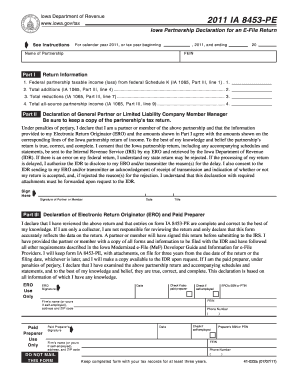
The IA 8453-PE is an important document for partnerships filing an electronic tax return in Iowa. This guide provides comprehensive, step-by-step instructions to help users complete the form accurately and efficiently online.
Follow the steps to successfully complete the IA 8453-PE online.
- Click ‘Get Form’ button to obtain the IA 8453-PE and open it in your preferred online editor.
- Enter the name of the partnership at the top of the form, followed by the Federal Employer Identification Number (FEIN).
- In Part I, Return Information, fill in the federal partnership taxable income (loss) from federal Schedule K (IA 1065, Part III, line 1) in the appropriate field.
- In Part II, Declaration of General Partner or Limited Liability Company Member Manager, read the declaration carefully.
- If filing through an ERO or paid preparer, proceed to Part III and complete the declarations as required.
- Ensure you supply the partner or member with copies of all necessary signed documents, including the IA 8453-PE and tax return with attachments.
- Once everything is complete, save changes to your document, and consider options to download, print, or share the form as needed.
Complete your IA 8453-PE online for a streamlined filing experience.
Get form
Experience a faster way to fill out and sign forms on the web. Access the most extensive library of templates available.
Get This Form Now!
Use professional pre-built templates to fill in and sign documents online faster. Get access to thousands of forms.