Loading
Get Md Dgs Mileage Log 2016-2026
How it works
-

Open form follow the instructions
-

Easily sign the form with your finger
-

Send filled & signed form or save
How to fill out the MD DGS Mileage Log online
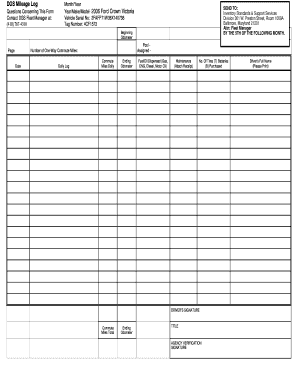
Completing the MD DGS Mileage Log online is a straightforward process that ensures accurate tracking of vehicle usage and fuel consumption. This guide provides clear, step-by-step instructions to help you fill out the form efficiently.
Follow the steps to complete the MD DGS Mileage Log accurately.
- Press the ‘Get Form’ button to obtain the MD DGS Mileage Log form and open it in the online editing tool.
- Begin by entering the month and year for which you are logging the mileage at the top of the form.
- Fill in the vehicle details, including the year, make, and model of your vehicle in the designated fields.
- Enter the vehicle serial number and tag number in their respective sections.
- In the 'Beginning Odometer' field, record the odometer reading at the start of the month.
- Document the number of one-way commute miles for each date in the 'Daily Log' section. This should reflect the mileage for every day you used the vehicle.
- Fill out the 'Ending Odometer' reading at the end of the month to track total mileage.
- List any fuel or oil dispensed, indicating the type of fuel (Gas, CNG, Diesel, Motor Oil) used during the month.
- In the maintenance section, if applicable, attach any receipts for maintenance performed on the vehicle.
- Report the number of tires and batteries purchased, marking 'T' for tires and 'B' for batteries in the provided space.
- At the bottom of the form, provide the driver's full name printed clearly, followed by their signature to validate the log.
- An agency representative must review and sign the form for verification, ensuring accuracy and compliance.
- Once all sections are completed, you can save the changes, download, print, or share the form as needed.
Complete your MD DGS Mileage Log online today to ensure accurate record-keeping and compliance.