Loading
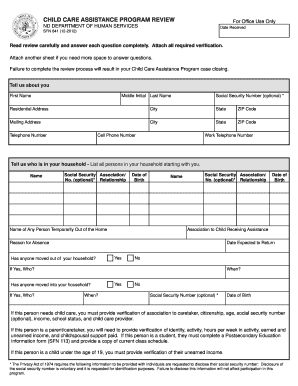
Get Nd Sfn 841 2011
How it works
-

Open form follow the instructions
-

Easily sign the form with your finger
-

Send filled & signed form or save
How to fill out the ND SFN 841 online
This guide provides clear, step-by-step instructions on how to complete the ND SFN 841 form online. Designed for users with varying levels of experience, this resource ensures that all necessary information is accurately recorded to facilitate the Child Care Assistance Program review.
Follow the steps to effectively complete your ND SFN 841 form.
- Click the ‘Get Form’ button to access the ND SFN 841 form and open it in your online form editor.
- Begin by filling in your personal details in the 'Tell us about you' section. Provide your first name, middle initial, last name, residential address, mailing address, and phone numbers. Be sure to include any optional Social Security Number if comfortable doing so.
- Move to the 'Tell us who is in your household' section. List all individuals living in your home, starting with yourself. For each person, you must provide their name, optional Social Security Number, relationship to you, and date of birth. If any person is temporarily out of the home, include their details and the reason for their absence.
- In the 'Tell us about school status' section, list all adult household members currently engaged in school or training. Include their course of education, anticipated degree, credit hours, and start and end dates. If there are any changes in school status, indicate who and explain.
- Next, complete the section regarding earned income. Provide last month’s income details for each employed household member, including employer information, hours worked, and income amounts. Indicate if there are anticipated changes to the income.
- Fill out the unearned income section for every household member, including children. Include details for various types of unearned income received last month and indicate if any changes are expected.
- Address any court-ordered child support or spousal support obligations. Indicate if anyone in your household pays or has changes to court-ordered support.
- In the 'Tell us what activities/programs you participate in' section, specify the activities that require child care. Clearly list the name of the parent participating, the type of allowable activity, and provide a detailed schedule of activities.
- Provide detailed information regarding your child care needs, listing the required details such as the name of children needing care, their grades, and the type of child care provider.
- Review the 'Rights and Responsibilities' section, read through the statements, and sign to declare that the information you provided is accurate. Ensure that you understand your obligations.
- Finally, save your completed form, and choose to download, print, or share it as needed to submit your application.
Complete your ND SFN 841 form online today to ensure your Child Care Assistance Program case remains active.
Get form
Experience a faster way to fill out and sign forms on the web. Access the most extensive library of templates available.
Get This Form Now!
Use professional pre-built templates to fill in and sign documents online faster. Get access to thousands of forms.