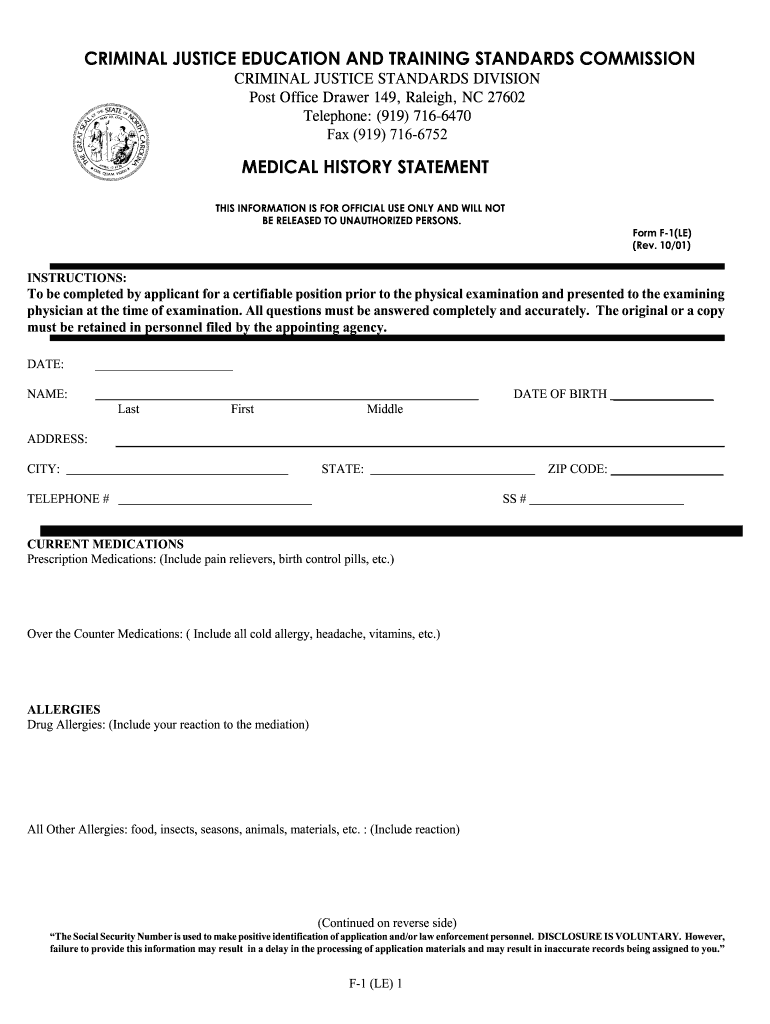
Y STATEMENT THIS INFORMATION IS FOR OFFICIAL USE ONLY AND WILL NOT BE RELEASED TO UNAUTHORIZED PERSONS. Form F-1(LE) (Rev. 10/01) INSTRUCTIONS: To be completed by applicant for a certifiable position prior to the physical examination and presented to the examining physician at the time of examination. All questions must be answered completely and accurately. The original or a copy must be retained in personnel filed by the appointing agency. DATE: ______________________ DATE OF BIRTH _______.
Loading

Open form follow the instructions

Easily sign the form with your finger

Send filled & signed form or save
How to fill out the NC F-1(LE) online
The NC F-1(LE) form is an essential document for individuals seeking a certifiable position in criminal justice. This guide provides clear, step-by-step instructions on how to accurately fill out the form online, ensuring a smooth process for all users.
Follow the steps to successfully complete the NC F-1(LE) form online.
- Click the ‘Get Form’ button to obtain the NC F-1(LE) form and open it in your preferred online editor.
- Fill in the date and your date of birth at the top of the form, ensuring accuracy in each entry.
- Enter your name in the designated fields — last name, first name, and middle name. Provide your complete address details including city, state, and zip code.
- Complete the social security number field, as it is required for identification purposes. Note that disclosure is voluntary, but not providing this information may delay application processing.
- Input your telephone number in the corresponding field.
- List all current medications, specifying whether each is a prescription or over-the-counter. Include all relevant information regarding dosage and frequency.
- Indicate any known allergies by checking the applicable boxes. Provide detailed descriptions of reactions to both drug and other allergies.
- In the family history section, mark any relevant health issues experienced by your parents or siblings.
- Detail any past medical history in the respective section, including hospitalizations and operations, with specific types, dates, and complications.
- Respond to the list of medical problems by checking all that apply to you as instructed.
- Complete the immunization history section, providing all necessary information regarding past vaccinations.
- In the occupational history section, check any exposures relevant to your work or other experiences.
- Answer the injury and physical capability questions to the best of your ability, providing explanations for any 'yes' responses if necessary.
- Review the answers thoroughly, ensuring all questions have been answered completely and accurately.
- Sign and date the certification section at the end of the form, confirming the truthfulness of the provided information.
- Once you have completed the form, save your changes, then download, print, or share the document as required.
Complete your NC F-1(LE) form online today for a streamlined application process.
Experience a faster way to fill out and sign forms on the web. Access the most extensive library of templates available.
Related content
F-1(LE) Form (Medical History Statement); F-2(LE) Form (Medical Examination Report);...
Instructions: To be completed by applicant for a certifiable position prior to the...
An agreement between Norfolk Southern Railway Company and Industry that sets forth...
Get answers to your most pressing questions about US Legal Forms API.
Can an NC tax return be filed electronically?
Yes, you can file an NC tax return electronically, making the process faster and more efficient. Electronic filing is especially recommended for those dealing with the NC F-1(LE), as it allows for quicker processing and potential refunds. To make this easier, explore uslegalforms, which provides resources and services to simplify your electronic filing experience.
How to file NC D 400?
To file NC D 400, you need to complete the form accurately and submit it to the North Carolina Department of Revenue. You can file by mail or online, depending on your preference and circumstances regarding the NC F-1(LE). Consider using uslegalforms for detailed instructions and electronic filing options that streamline your submission process.
How to fill out NC D 400?
Filling out NC D 400 requires careful attention to your income and deduction details. Begin by gathering all necessary documents, then follow the step-by-step instructions for the NC D 400, ensuring you accurately report your financial information as it relates to your NC F-1(LE). You can simplify this process by utilizing uslegalforms, which offers comprehensive templates to guide you.
Can I get a tax refund if my only income is social security?
Yes, you can receive a tax refund even if your only income is social security, depending on your tax situation and credits. To fully understand your eligibility, evaluate the specifics of your financial situation in relation to the NC F-1(LE). Filing with uslegalforms can provide you with the tools to navigate this process and determine if any refunds are due to you.
What is form D 400V?
Form D 400V is a crucial document related to the NC F-1(LE) process. This form is specifically used for reporting certain tax credits and deductions available to North Carolina taxpayers. Understanding the details of form D 400V can help you maximize your tax benefits. For assistance, consider using uslegalforms to find templates and guidance tailored to your needs.
How many hours is BLET in NC?
The Basic Law Enforcement Training (BLET) program in North Carolina typically requires about 640 hours of instruction. This comprehensive training prepares individuals for careers in law enforcement by covering various topics, from criminal laws to practical skills. Completing the BLET equips candidates with the necessary experience to take the next steps in their careers. For specific details and resources, visit the US Legal Forms website to streamline your learning journey.
What is a NC F-1(LE)?
The NC F-1(LE) form is essential for those seeking to license law enforcement officers in North Carolina. This form ensures that the appropriate qualifications and requirements are met for prospective individuals in the field. Completing the NC F-1(LE) is vital for maintaining standards in law enforcement and safeguarding the community. You can find resources and guidance on completing this form effectively on the US Legal Forms platform.
What is the number one ADN program in NC?
When looking for the top ADN program in NC, many students consider institutions like the University of North Carolina at Charlotte or Wake Technical Community College. These programs are known for their exceptional curricula and hands-on training in nursing. Graduating from a respected ADN program can open many opportunities in healthcare. To benefit fully from your education, including understanding legal forms associated with medical practices, turn to platforms like US Legal Forms.
How hard is blet in NC?
Many candidates find the BLET program in NC challenging yet rewarding. The coursework is rigorous and covers various topics, including physical fitness, law, and firefighting techniques. However, with dedication and proper preparation, most students can thrive. Utilizing resources like the NC F-1(LE) can further assist you in building the skills needed to excel.
How long is Blet School in NC?
BLET schools in North Carolina typically run for about 16 weeks, offering a structured schedule that balances classroom instruction and practical training. During this time, candidates can expect to engage in around 640 hours of training, covering all essential aspects of law enforcement. The time invested equips you with the necessary knowledge and skills to succeed in your career. Interested individuals can also explore options with NC F-1(LE) for specialized instruction.
Use professional pre-built templates to fill in and sign documents online faster. Get access to thousands of forms.
If you believe that this page should be taken down, please follow our DMCA take down process here.
This form is available in several versions. Select the version you need from the drop-down list below.