Loading
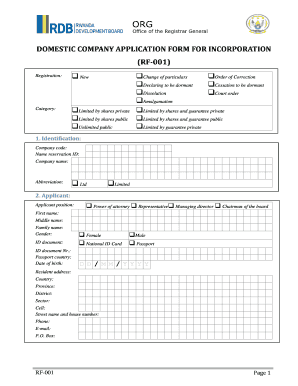
Get Domestic Company Application Form For Incorporation - Rwanda Eregulations
How it works
-

Open form follow the instructions
-

Easily sign the form with your finger
-

Send filled & signed form or save
How to fill out the domestic company application form for incorporation - Rwanda Eregulations online
Filling out the domestic company application form for incorporation in Rwanda is an essential step for establishing a new company. This guide aims to provide clear, step-by-step instructions to ensure users can complete the form accurately and efficiently online.
Follow the steps to successfully complete the application form.
- Click ‘Get Form’ button to obtain the form and open it for editing.
- Begin by selecting the registration type. Indicate whether you are registering as a new company or changing particulars. Options include new registration, dissolution, or other status changes.
- Fill in the company identification section. Provide the company code, name reservation ID, and the proposed company name. You may also include an abbreviation, selecting either 'Ltd' or 'Limited'.
- In the applicant section, specify the position of the applicant (e.g., managing director or representative). Also, provide their first name, middle name, family name, gender, and identification details.
- Complete the resident address section for the applicant, including country, province, district, sector, cell, street name and house number, phone, email, and P.O. Box.
- Fill in the head office address with similar information as in the applicant section to ensure proper registration.
- Options for the chairman of the board are optional. If applicable, complete their details similarly as with the applicant.
- For the managing director, repeat the process to provide personal information including name, gender, ID documentation, and address.
- Next, fill out the company employee or secretary section with the required personal information.
- Continue by listing members of the board. If there are multiple members, ensure all necessary details are fully filled out.
- Provide information about the auditor, specifying whether they are a person or an organization, and fill in their details.
- Similarly, complete the accountant section with the required information.
- Outline business activities, making sure to include the relevant RCPA code and name.
- In the capital information section, list the share type, number of shares, par value, and total for the company.
- For subscribers, supply details for individuals or organizations who will be subscribing to shares.
- The guarantor section follows the same format as subscribers, collecting all relevant details.
- Document the date of hiring the first employee and the number of employees on the registration date.
- Complete any sections relevant to amalgamation, declaring status, or dissolution as required.
- Attach any necessary documents or certifications as specified in the attachments section.
- Finally, certify the form by signing and dating it, ensuring that all information is true and complete.
- Once completed, save your changes, then download, print, or share the application form as needed.
Start completing your documents online today!
Required Documents 3 Legal persons Representatives expand_more expand_less Passport. ... Memorandum of association form. ... Proof of identity. ... Certificate of incorporation of the holding company. ... Memorandum of association of the holding company. ... Board resolution to subscribe to the company to be formed.
Industry-leading security and compliance
US Legal Forms protects your data by complying with industry-specific security standards.
-
In businnes since 199725+ years providing professional legal documents.
-
Accredited businessGuarantees that a business meets BBB accreditation standards in the US and Canada.
-
Secured by BraintreeValidated Level 1 PCI DSS compliant payment gateway that accepts most major credit and debit card brands from across the globe.