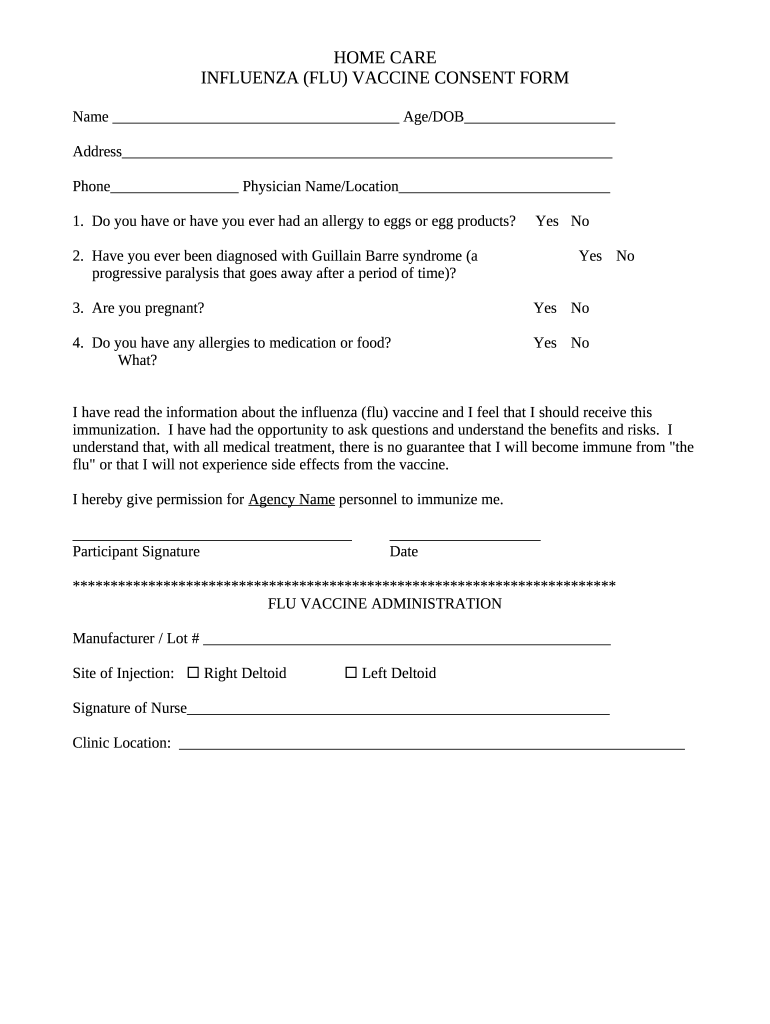
Ne Physician Name/Location 1. Do you have or have you ever had an allergy to eggs or egg products? Yes No 2. Have you ever been diagnosed with Guillain Barre syndrome (a progressive paralysis that goes away after a period of time)? Yes No 3. Are you pregnant? Yes No 4. Do you have any allergies to medication or food? What? Yes No I have read the information about the influenza (flu) vaccine and I feel that I should receive this immunization. I.
Loading

Open form follow the instructions

Easily sign the form with your finger

Send filled & signed form or save
How to fill out the INFLUENZA (FLU) VACCINE CONSENT FORM online
Filling out the influenza vaccine consent form online is a straightforward process designed to ensure your safe vaccination. This guide will provide you with step-by-step instructions to navigate the form effectively.
Follow the steps to complete the form accurately.
- Press the ‘Get Form’ button to access the influenza vaccine consent form and open it in your preferred online editor.
- Begin by entering your personal information. Fill in your name, age or date of birth, address, and phone number in the designated fields.
- Next, provide the name and location of your physician in the corresponding field.
- Respond to the questions regarding allergies: indicate if you have or have ever had an allergy to eggs or egg products by selecting 'Yes' or 'No'.
- Answer whether you have been diagnosed with Guillain Barre syndrome, again selecting 'Yes' or 'No'.
- Indicate if you are currently pregnant by choosing 'Yes' or 'No'.
- Report any allergies to medications or food in the provided field. Choose 'Yes' or 'No' and specify the type of allergies if applicable.
- Read the information provided about the influenza vaccine. Confirm your understanding by signing the form and dating it in the appropriate spaces.
- Finalize your submission by checking all entries for accuracy. After ensuring the form is complete, you can save your changes, download, print, or share the form as needed.
Complete your influenza vaccine consent form online today for a smoother vaccination experience.
Experience a faster way to fill out and sign forms on the web. Access the most extensive library of templates available.
Related content
Annual Influenza Vaccine Consent Form-FLU SHOT and NASAL SPRAY. Below are notes about each...
Influenza Vaccination Consent Form. Last Name: First Name: Date of Birth: Screening for...
The 'Immunization Report' window appears. The Non-Influenza. 15. Consent Form prints. This...
Get answers to your most pressing questions about US Legal Forms API.
What would be considered a contraindication to receiving the influenza vaccination?
Children younger than 6 months of age are too young to get a flu shot. People with severe, life-threatening allergies to any ingredient in a flu vaccine (other than egg proteins) should not get that vaccine. This might include gelatin, antibiotics, or other ingredients.
What is the ICD code for flu vaccine?
ICD-10 requires only one code (Z23) per vaccination, regardless if single or combination. Report Z23 for all vaccination diagnoses.
How do you code for influenza?
90686, “Influenza virus vaccine, quadrivalent (IIV4), split virus, preservative free, 0.5 mL dosage, for intramuscular use.” 90688, “Influenza virus vaccine, quadrivalent (IIV4), split virus, 0.5 mL dosage, for intramuscular use.”
What are the influenza vaccine precautions?
Influenza vaccine precautions: Moderate to severe illness with or without fever (temporary precaution). History of Guillain-Barre syndrome after influenza vaccination. History of a severe allergic reaction to a different type of flu vaccine.
Can you be forced to have the flu vaccine?
It is important to note that employees need to be properly informed of the benefits of the vaccinations. However, although OSHA does not specifically require employees to take the vaccines, an employer may do so.
When do you use ICD-10 code Z23?
ICD-10 code Z23 is reported for vaccine-related encounters for all vaccines given within the encounter. Z23 is the ICD-10 code that identifies an encounter for immunization(s).
How do you bill 90686?
Use the CPT code for the vaccine administered (90686) and link to the diagnosis code for the immunization. Because qualified counseling occurred for a patient younger than 18 years of age, bill 1 unit of 90460 for administering influenza vaccine.
How do you bill for influenza A and B?
Therefore, when a clinician orders testing for influenza A and B, CPT® 87400 is used twice, once for influenza type A and once for influenza type B. 59. The CPT® code modifier 59 is used to identify a distinct procedural service.
Can you still get the flu even if you are vaccinated?
Can I get seasonal flu even though I got a flu vaccine this year? Yes. It's possible to get sick with flu even if you have been vaccinated (although you won't know for sure unless you get a flu test).
What is the CPT code for flu vaccine 2022?
Payment Allowances and Effective Dates for the 2022-2023 Flu Season: CodeLabeler NameVaccine Name90688Sanofi Pasteur SeqirusFluzone Quadrivalent (2022/2023) Afluria Quadrivalent (2022/2023)90694SeqirusFluad Quadrivalent (2022/2023) (Preservative Free)90756SeqirusFlucelvax Quadrivalent (2022/2023)6 more rows • 12 Sept 2022
Use professional pre-built templates to fill in and sign documents online faster. Get access to thousands of forms.
If you believe that this page should be taken down, please follow our DMCA take down process here.