Loading
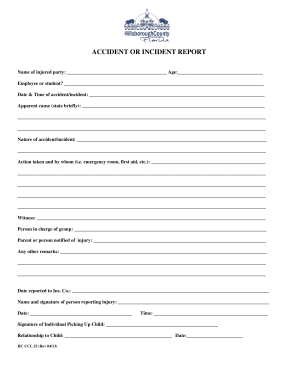
Get Fl Hc Ccl 25 - Hillsborough County 2013-2026
How it works
-

Open form follow the instructions
-

Easily sign the form with your finger
-

Send filled & signed form or save
How to fill out the FL HC CCL 25 - Hillsborough County online
The FL HC CCL 25 form is an essential document used to report accidents or incidents involving individuals, particularly in educational or caregiving settings. This guide provides clear and structured steps to help users efficiently complete this form online, ensuring all necessary information is captured accurately.
Follow the steps to complete the FL HC CCL 25 form securely and accurately.
- Press the ‘Get Form’ button to access the FL HC CCL 25 document and open it in your preferred editor.
- Begin by entering the name of the injured party in the designated field. Ensure the spelling is correct for accurate records.
- Next, fill in the age of the injured party within the specified space. This helps in understanding the demographics involved in the incident.
- Indicate whether the injured party is an employee or a student by selecting the appropriate option provided in the form.
- Record the date and time of the accident or incident precisely, as this information is crucial for documentation.
- State the apparent cause of the accident or incident briefly. Be concise and provide enough detail to convey the nature of the incident.
- In the designated section, describe the nature of the accident or incident thoroughly to provide a clear understanding of what occurred.
- Document the action taken following the incident and specify who performed it, such as emergency room staff or first aid responders.
- Fill in the details of any witnesses present during the incident to provide additional context to the report.
- Indicate the person in charge of the group at the time of the incident, as this person may need to provide further information if required.
- Include the name of the parent or person who was notified about the injury to ensure they are kept informed.
- Use the remarks section to add any additional comments or information that may be relevant to the incident.
- In the section for reporting, enter the date when the incident was reported to the insurance company.
- Finally, provide your name and signature in the designated area to acknowledge that the information provided is accurate.
- Complete the form by entering the date and time and adding the signature of the individual picking up the child, along with their relationship to the child.
Complete your documents online to ensure a streamlined and efficient process.
You must have one staff person for every 50 children or increment thereof with verification of completion of the Infant / Child CPR Course present at the facility at all times.