Loading
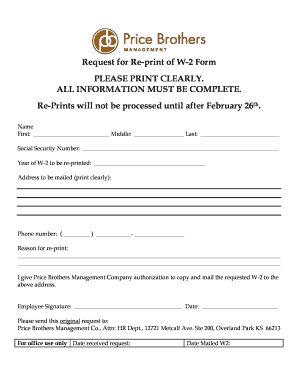
Get Ks Price Brothers Management Request For Re-print Of W-2 Form 2007-2025
How it works
-

Open form follow the instructions
-

Easily sign the form with your finger
-

Send filled & signed form or save
How to fill out the KS Price Brothers Management Request For Re-print Of W-2 Form online
This guide aims to assist users in completing the KS Price Brothers Management Request For Re-print Of W-2 Form online effectively. By following the steps outlined below, users can ensure that their requests are submitted accurately and promptly.
Follow the steps to successfully complete the form.
- Click ‘Get Form’ button to obtain the form and open it in the editor.
- Enter your name clearly in the designated fields. Provide your first name, middle name, and last name to ensure accurate identification.
- Fill in your Social Security Number in the provided space. This information is crucial for the verification and processing of your request.
- Indicate the year of the W-2 you are requesting to have re-printed. Ensure that you select the correct year to avoid any errors in processing.
- Complete the address section clearly, where you would like the re-printed W-2 to be mailed. Ensure that all details are correct to avoid delays.
- State the reason for requesting the re-print in the designated area. Be as detailed as possible to assist the processing team in understanding your request.
- Review the authorization statement, confirming that you allow Price Brothers Management Company to copy and send the W-2 to the given address.
- After completing all sections, verify that all information is accurate and complete. Once confirmed, you may download or print the form to send it.
- Send the original request to the specified address: Price Brothers Management Co., Attn: HR Dept., 12721 Metcalf Ave. Ste 200, Overland Park KS 66213.
Take action now by completing the KS Price Brothers Management Request For Re-print Of W-2 Form online to ensure your request is processed efficiently.
To add a digital signature, open your Microsoft Word document and click where you'd like to add your signature line. From the Word ribbon, select the Insert tab and then click Signature Line in the Text group. A Signature Setup pop-up box appears. Enter your information in the text fields and click OK.
Industry-leading security and compliance
US Legal Forms protects your data by complying with industry-specific security standards.
-
In businnes since 199725+ years providing professional legal documents.
-
Accredited businessGuarantees that a business meets BBB accreditation standards in the US and Canada.
-
Secured by BraintreeValidated Level 1 PCI DSS compliant payment gateway that accepts most major credit and debit card brands from across the globe.