Loading
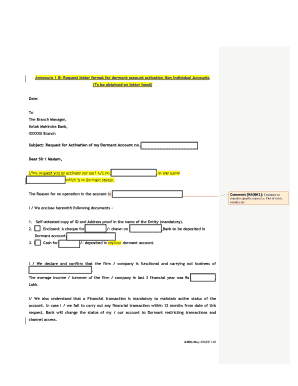
Get Customer Request Form Axis Bank
How it works
-

Open form follow the instructions
-

Easily sign the form with your finger
-

Send filled & signed form or save
How to fill out the Customer Request Form Axis Bank online
Filling out the Customer Request Form for Axis Bank is a straightforward process designed to facilitate the activation of dormant accounts. This guide provides clear, step-by-step instructions to ensure that you can complete the form accurately and efficiently.
Follow the steps to complete the Customer Request Form.
- Click ‘Get Form’ button to access the Customer Request Form and open it for completion.
- Begin by entering the date at the top of the form. This indicates when the request is being made.
- Next, address your request to the Branch Manager, specifying the relevant branch name of Axis Bank.
- In the subject line, clearly state your purpose: 'Request for Activation of Dormant Account no._________'. Fill in your account number in the blank.
- In the body of the letter, state your request to activate the dormant account. Include the name associated with the account.
- Provide a specific reason for the inactivity of the account, which might include details like being out of town or country.
- Indicate the documents you are enclosing with the form, such as a self-attested copy of your ID and address proof (mandatory).
- If applicable, mention any financial contributions you are making, like a cheque amount or cash deposit, specifying the details of the transaction.
- Declare your organization's operational status, including the type of business and average annual turnover over the last three financial years.
- Read and acknowledge the terms and conditions regarding the account activation, ensuring you understand the transaction requirements.
- Sign the form as the authorized signatory, including your stamp if applicable.
- Finally, review all information for accuracy, then save your changes, download, or print the completed form for submission.
Complete the Customer Request Form online today to reactivate your dormant account.
Get your Customer ID Your Customer ID is mentioned on the welcome letter and cheque book that is mailed to you post your account opening. You can also SMS CUSTID <account-number> to 56161600 from your registered mobile number to get your Customer ID*.