Loading
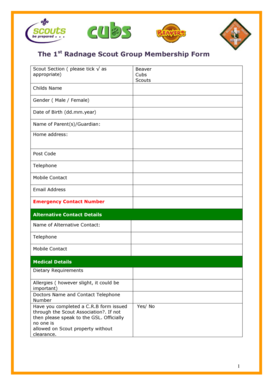
Get Scout Membership Form Generic-1 - Radnagescouts Org
How it works
-

Open form follow the instructions
-

Easily sign the form with your finger
-

Send filled & signed form or save
How to fill out the Scout Membership Form Generic-1 - Radnagescouts Org online
This guide provides a step-by-step approach to filling out the Scout Membership Form Generic-1 for Radnagescouts Org online. Whether you are a first-time user or familiar with membership forms, this guide will ensure you accurately complete each section with confidence.
Follow the steps to successfully complete your Scout Membership Form online.
- Click ‘Get Form’ button to obtain the form and open it for editing.
- Begin by selecting the appropriate scout section by ticking the box for Beaver, Cubs, or Scouts. This designates the group your child will join.
- In the 'Child's Name' field, enter the first name and surname of the child. Below this, specify the child's gender by selecting either Male or Female.
- Enter the child's date of birth in the format dd.mm.year. This helps verify age eligibility for the selected scout section.
- Input the name of the parent or guardian responsible for the child. Ensure the full name is clearly written.
- Fill in the home address by clearly providing the street address, town or city, and postal code.
- Provide contact telephone and mobile numbers, making sure they are valid and active for communication purposes.
- Enter a valid email address to ensure receipt of important information related to scouting.
- Supply an emergency contact number and alternative contact details, if available. Fill out the name and contact information for the alternative contact.
- Provide any medical details necessary for the child's care, including dietary requirements, allergies, and the name and contact number of the child's doctor.
- Indicate whether you have completed a C.R.B form issued through the Scout Association by answering 'Yes' or 'No'. If you need to complete this, please consult the Group Scout Leader (GSL).
- Grant permission for the child's photograph to be displayed in scouting publications or on the Radnage scout website by selecting 'Yes' or 'No'. If you choose 'No', please specify your reason.
- Decide whether you permit sharing your telephone or email with other parents within the group by selecting 'Yes' or 'No'.
- Indicate prior involvement in Scouting or Guiding by marking 'Yes' or 'No'.
- Agree to the Code of Conduct by indicating 'Yes' or 'No'. Reviewing the Code of Conduct is essential before agreeing.
- Select your availability to assist with group activities by indicating 'Yes', 'No', or 'Maybe'. Specify the type of help you can provide if possible.
- Review the subscription information provided. Confirm your annual membership subscription selection by ticking the appropriate box: cheque, EFT, or standing order form.
- Complete the Data Protection section, acknowledging that the information will be used solely for scouting purposes. No details will be shared except as stated.
- Finally, sign the form with the signature of the parent or guardian along with the date of application.
- After completing all fields, save your changes, and consider downloading, printing, or sharing the form as needed.
Complete your Scout Membership Form online today to ensure your child’s participation in Radnage Scout Group!
Industry-leading security and compliance
US Legal Forms protects your data by complying with industry-specific security standards.
-
In businnes since 199725+ years providing professional legal documents.
-
Accredited businessGuarantees that a business meets BBB accreditation standards in the US and Canada.
-
Secured by BraintreeValidated Level 1 PCI DSS compliant payment gateway that accepts most major credit and debit card brands from across the globe.