Loading
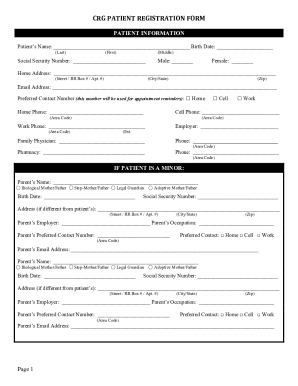
Get In Crg Patient Registration Form 2022-2026
How it works
-

Open form follow the instructions
-

Easily sign the form with your finger
-

Send filled & signed form or save
How to fill out the IN CRG Patient Registration Form online
Completing the IN CRG Patient Registration Form online can streamline your patient registration process and ensure that your information is accurately captured. This guide provides step-by-step instructions to help you navigate the online form efficiently.
Follow the steps to successfully complete the registration form
- Click ‘Get Form’ button to obtain the form and open it in your preferred document editor.
- Begin by entering the patient's information in the designated fields. Fill in the patient’s name, birth date, and social security number. Select the patient’s gender and provide the home address, email address, and preferred contact number.
- If the patient is a minor, provide the parent’s or legal guardian's details, including their name, birth date, social security number, address, employer, occupation, contact number, and email address.
- Complete the primary insurance section. Fill in the insurance company name, phone number, policy holder’s ID, group number, payer ID, claim address, employer details, policy holder’s name and birth date, and relationship to the patient.
- If necessary, complete the behavioral health section by indicating whether the primary insurance handles behavioral health coverage. If a separate behavioral health carrier is used, fill in the relevant details for that carrier.
- If the patient has secondary insurance (only if it is SAGAMORE), provide the required details similarly to the primary insurance section.
- Review and complete the consent to treat section. Ensure that you or the legal guardian signs and dates this section of the form.
- Fill out the acknowledgment section confirming receipt of the CRG Patient Admission Packet. Sign and date as appropriate.
- Complete the email communications section by consenting to electronic communication. Sign and date as necessary.
- Provide your consent for medical photography as indicated in the form and sign where required.
- Fill out emergency contact information, providing the contact's name, relationship to the patient, and preferred contact number.
- Complete the financial agreement by signing and dating the section. Ensure that you provide accurate personal details for the responsible party.
- Fill out the credit card authorization section if applicable. Provide all requested details and ensure to sign this section.
- After reviewing all information for accuracy, save changes to the form. You may choose to download, print, or share the completed form as necessary.
Ensure your registration is complete by filling out the IN CRG Patient Registration Form online today.