Loading
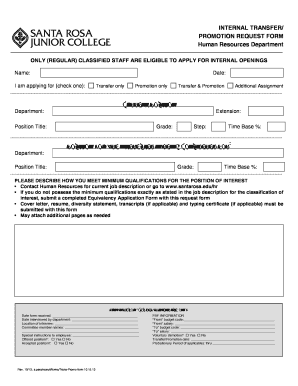
Get Santa Rosa Junior College Internal Transfer/promotion Request Form 2013-2026
How it works
-

Open form follow the instructions
-

Easily sign the form with your finger
-

Send filled & signed form or save
How to fill out the Santa Rosa Junior College Internal Transfer/Promotion Request Form online
This guide provides comprehensive instructions on completing the Santa Rosa Junior College Internal Transfer/Promotion Request Form online. Follow these detailed steps to ensure a smooth submission process.
Follow the steps to accurately complete the transfer/promotion request form.
- Click the ‘Get Form’ button to access the internal transfer/promotion request form and open it in your preferred editor.
- Start by filling in your name and the date at the top of the form. Ensure that all fields are filled in accurately to avoid delays in processing.
- Complete the current position section with details including your department, extension, position title, grade, step, and time base percentage.
- In the section for the position you are interested in being considered for, provide the department and position title, along with the grade and time base percentage.
- Describe how you meet the minimum qualifications for the desired position. It is advised to contact Human Resources for the job description or obtain it from the human resources website.
- Attach required documents such as a cover letter, resume, diversity statement, transcripts (if necessary), and a typing certificate (if needed). You may attach additional pages for further details.
- Review the form for completeness and accuracy before submission. Make sure all required sections are filled appropriately.
Begin the online submission process by completing your Internal Transfer/Promotion Request Form today!