Loading
Get Oh Ged Test Application 2007-2026
How it works
-

Open form follow the instructions
-

Easily sign the form with your finger
-

Send filled & signed form or save
How to fill out the OH GED Test Application online
Filling out the Ohio GED Test Application online is a crucial step toward obtaining your High School Equivalence Diploma. This guide provides clear and structured instructions to help you complete the application accurately and efficiently.
Follow the steps to complete your application successfully.
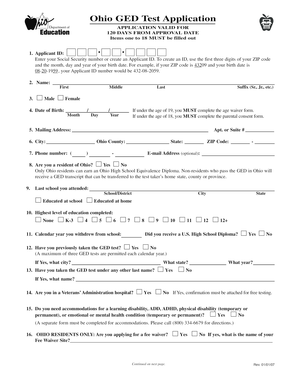
- Click 'Get Form' button to access the OH GED Test Application form and open it for editing.
- Enter your applicant ID. This can be your Social Security number or a custom ID created using the first three digits of your ZIP code followed by your birth date. For instance, if your ZIP code is 43209 and your birth date is August 20, 1959, your ID would be 432-08-2059.
- Fill out your name in the designated fields: first name, middle name, last name, and suffix if applicable.
- Provide your date of birth in the specified format, ensuring to include the month, day, and year accurately.
- Enter your mailing address, including any apartment or suite number, city, state, and ZIP code.
- Indicate whether you are a resident of Ohio. Only Ohio residents are eligible for the Ohio High School Equivalence Diploma.
- List the last school you attended, including the name, city, and state, or indicate if you were educated at home.
- Select your highest level of education completed from the provided options.
- If applicable, enter the calendar year you withdrew from school and indicate whether you received a U.S. High School Diploma.
- Answer whether you have previously taken the GED test, including the city and state if applicable.
- Complete the section regarding any previous last names used when taking the GED test.
- Indicate if you are currently in a Veterans’ Administration hospital and attach necessary confirmation if applicable.
- If you require accommodations for any disabilities, specify your needs and note that a separate form is required.
- Ohio residents can apply for a fee waiver. Indicate if you are applying for this and provide the name of your fee waiver site, if applicable.
- Fill in your race and ethnic background by checking the appropriate box.
- Specify the reason for testing by checking all relevant options provided.
- Acknowledge the application fee requirements and ensure that a payment method is enclosed unless a fee waiver is applied.
- Confirm the accuracy of your information by checking the box to affirm completeness and eligibility.
- Provide your signature and ensure it is notarized as required. Include the date and notary details.
- Finally, save changes to your application, download, print, or share it, and ensure it is mailed to the appropriate address.
Complete your OH GED Test Application online today for a smoother testing experience.
The GED test is just as hard in Ohio as it is in any other state because the GED is a national exam that's the same in every state.