Loading
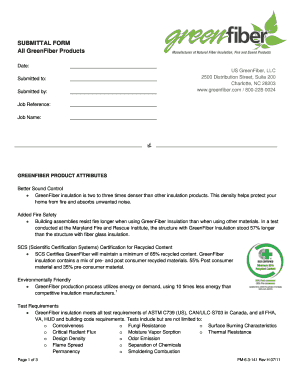
Get Green Fiber Pm-6.3-141 2011
How it works
-

Open form follow the instructions
-

Easily sign the form with your finger
-

Send filled & signed form or save
How to fill out the Green Fiber PM-6.3-141 online
Filling out the Green Fiber PM-6.3-141 form online is a straightforward process that can be completed in a few easy steps. This guide provides a comprehensive overview to help you navigate each section of the form efficiently.
Follow the steps to fill out the Green Fiber PM-6.3-141 form online.
- Click the ‘Get Form’ button to access the Green Fiber PM-6.3-141 form. Ensure that you have a stable internet connection to load the form properly.
- Fill in the date field at the top of the form using the current date in the required format.
- Complete the 'Submitted to' section with the name or title of the person or organization that will receive the submission.
- In the 'Submitted by' field, enter your name or the name of the entity submitting the form.
- Provide the job reference number in the corresponding space to ensure accurate tracking of the submission.
- Input the job name associated with this submission for clarity and reference.
- Review your inputs for accuracy, then save your changes. You typically have options to download, print, or share the completed form.
Get started and complete your Green Fiber PM-6.3-141 form online today!
Get form
Experience a faster way to fill out and sign forms on the web. Access the most extensive library of templates available.
Get This Form Now!
Use professional pre-built templates to fill in and sign documents online faster. Get access to thousands of forms.