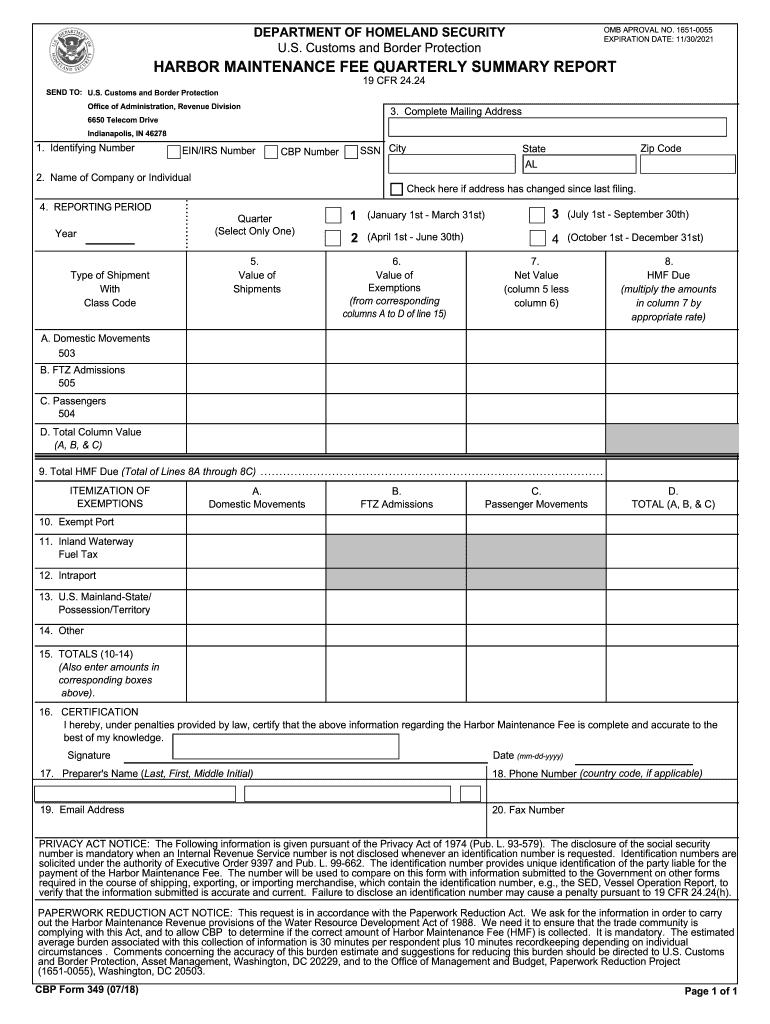
DEPARTMENT OF HOMELAND SECURITY U.S. Customs and Border Protection OMB APPROVAL NO. 16510055 EXPIRATION DATE: 11/30/2021HARBOR MAINTENANCE FEE QUARTERLY SUMMARY REPORT 19 CFR 24.24SEND TO: U.S. Customs.

Open form follow the instructions

Easily sign the form with your finger

Send filled & signed form or save
How to fill out the CBP Form 349 online
Filling out the CBP Form 349 online is essential for accurately reporting the Harbor Maintenance Fee. This guide provides a step-by-step approach to ensure users can successfully complete the form with confidence and ease.
Follow the steps to fill out the CBP Form 349 online
- Press the ‘Get Form’ button to access and open the form in the editor.
- Provide your identifying number in Box 1. Indicate whether it is an EIN, SSN, or CBP Number by checking the appropriate box.
- Enter the name of your company or individual in Box 2.
- For Box 3, fill in your complete mailing address, including street address, city, state, and zip code.
- In Box 4, select the reporting period by entering the four-digit year and checking the appropriate quarter box.
- Input the total value of shipments for various types in Box 5—Domestic Movements, FTZ Admissions, and Passenger Movements.
- List the value of any exemptions in Box 6. Refer to the itemization of exemptions and ensure they are accurately represented.
- Calculate the net value in Box 7 by subtracting any exemptions from the total value of shipments.
- Complete Box 8 by calculating the HMF due based on the net value.
- Add up total HMF due in Box 9, which includes the calculations from previous boxes.
- Fill in the itemization of exemptions in Boxes 10 through 14, detailing the various exemption types as required.
- Sign and date the form in Box 16 to certify that the information provided is accurate. Provide the name and contact information of the preparer in the subsequent boxes.
- Once all sections of the form are completed, save your changes. You may choose to download, print, or share the completed form as necessary.
Complete the CBP Form 349 online for efficient submission and compliance.
Experience a faster way to fill out and sign forms on the web. Access the most extensive library of templates available.
Related content
Item 14A. Supplemental Payment Due - If two types of shipments were included on the CBP...
Feb 27, 2018 — Pedreiro, 349 U. S. 48, 49, 52–53 (1955) (holding that the...
Feb 14, 2020 — In the 2018 midterm election, 25 percent of voters cast ballots by mail...
Use professional pre-built templates to fill in and sign documents online faster. Get access to thousands of forms.
If you believe that this page should be taken down, please follow our DMCA take down process here.
This form is available in several versions. Select the version you need from the drop-down list below.