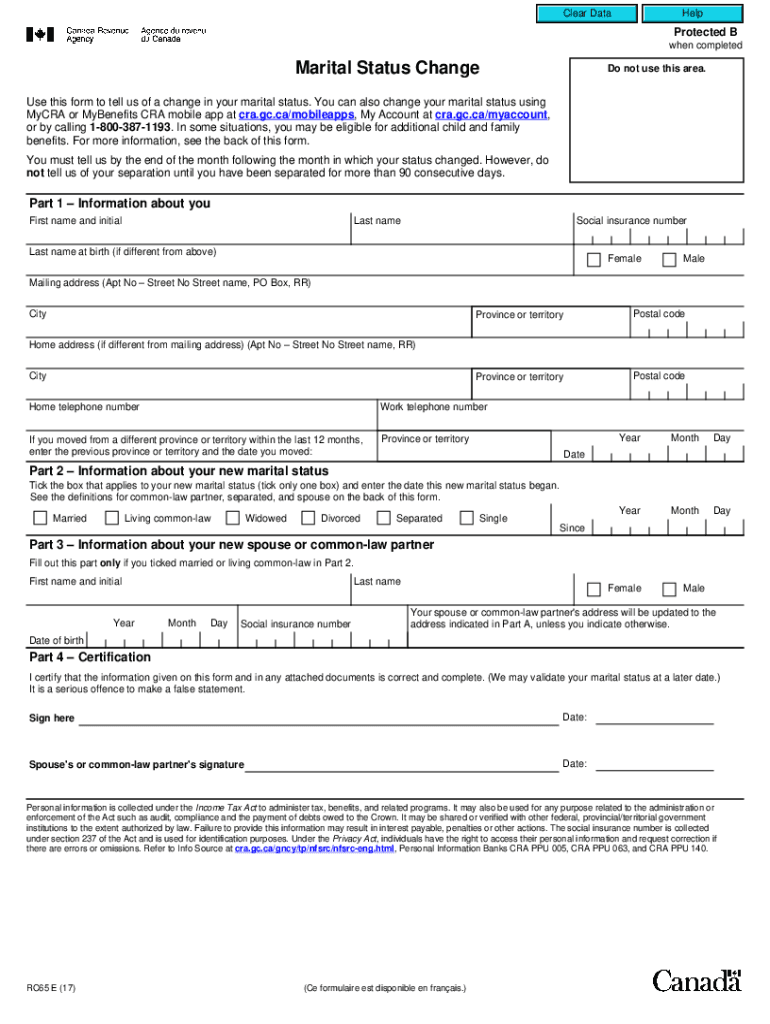
Clear DataHelpProtected B when completedMarital Status Changed not use this area. Use this form to tell us of a change in your marital status. You can also change your marital status using Myra or.

Open form follow the instructions

Easily sign the form with your finger

Send filled & signed form or save
How to fill out the Canada RC65 E online
This guide will provide comprehensive instructions on how to effectively complete the Canada RC65 E form online. It is essential for individuals to notify the Canada Revenue Agency of any changes in marital status, ensuring accurate processing of benefits.
Follow the steps to fill out the Canada RC65 E form online.
- Press the ‘Get Form’ button to acquire the Canada RC65 E form and open it in your preferred editor.
- In Part 1, provide your personal information. Fill in your first name and initial, last name, social insurance number, and mailing address, including postal code. If your home address is different, complete that section as well. Additionally, include your home and work telephone numbers, and if applicable, enter your previous province or territory and the date you moved.
- In Part 2, indicate your new marital status by ticking the appropriate box that reflects your current situation—married, living common-law, widowed, divorced, separated, or single. Also, input the date your new marital status commenced.
- If you selected 'married' or 'living common-law' in Part 2, complete Part 3 with information about your new spouse or common-law partner. This includes their first name, last name, social insurance number, address (if different), and date of birth.
- In Part 4, certify that the information provided is accurate by signing the form and entering the date. If your spouse or common-law partner is also signing, they should do so in the designated area.
- Review your entries for accuracy and completeness. Once confirmed, you can save changes to the form, download it for your records, print it, or share it as necessary.
Complete the Canada RC65 E form online today to ensure your marital status update is processed efficiently.
Experience a faster way to fill out and sign forms on the web. Access the most extensive library of templates available.
Related content
... e.g. Punched-card systems. Cf. RA976+ Medical record departments and administration...
Jun 4, 2018 — Prof. Rama Chellappa is a Distinguished University Professor, a Minta...
The Rockwell scale is a hardness scale based on indentation hardness of a material....
Use professional pre-built templates to fill in and sign documents online faster. Get access to thousands of forms.
If you believe that this page should be taken down, please follow our DMCA take down process here.
This form is available in several versions. Select the version you need from the drop-down list below.