Loading
Get Yes Bank Net Banking
How it works
-

Open form follow the instructions
-

Easily sign the form with your finger
-

Send filled & signed form or save
How to fill out the Yes Bank Net Banking online
This guide provides a comprehensive overview for users looking to fill out the Yes Bank Net Banking online registration form. Follow these instructions carefully to ensure accurate completion of your registration.
Follow the steps to successfully fill out the registration form
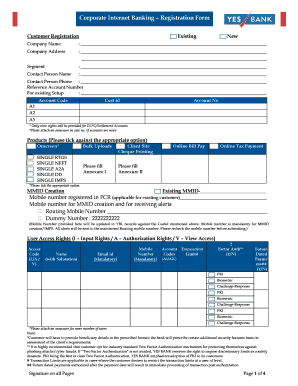
- Click the ‘Get Form’ button to obtain the registration form and access it in the specified editor.
- Select whether you are an existing customer or a new customer by marking the appropriate box on the form. Provide your company name and address in the designated fields.
- Indicate your business segment in the specified section. Provide the name and phone number of the contact person responsible for this registration.
- If applicable, enter the reference account number for existing setups and fill out the associated account details, including account code and customer ID.
- Tick the products you require, such as bulk uploads, cheque printing, or online bill pay. Fill out additional annexures if necessary.
- Input mobile numbers required for MMID creation and receiving alerts. Ensure you check the accuracy of these numbers.
- For each user requiring access rights, complete the section with their name, email ID, mobile number, and select the appropriate access rights (input, authorization, or view access).
- If your organization has numerous users, attach an annexure for a complete list of required user access details.
- Review the tips for secure online banking included in the form. Ensure you understand the importance of protecting your account information.
- Read through the terms and conditions. Confirm your understanding by signing on all pages of the form.
- Once all sections are completed, review the form for accuracy. After confirming all entries are correct, you may save, download, print, or share the form as needed.
Take action now and complete your registration by filling out the Yes Bank Net Banking form online.