Loading
Get Oh Nb-365 2021-2026
How it works
-

Open form follow the instructions
-

Easily sign the form with your finger
-

Send filled & signed form or save
How to fill out the OH NB-365 online
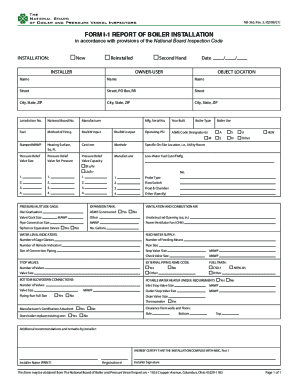
The OH NB-365 form is essential for reporting boiler installations in compliance with the National Board Inspection Code. This guide provides clear, step-by-step instructions to assist users in accurately completing the form online.
Follow the steps to complete the OH NB-365 form with ease.
- Click ‘Get Form’ button to access the OH NB-365 online form.
- Indicate the type of installation by selecting from 'New,' 'Reinstalled,' or 'Second Hand.' Enter the date of installation in the designated field.
- Fill in the owner's name and provide the complete address, including street, city, state, and ZIP code.
- Enter the jurisdiction number and National Board number as supplied by your regulatory authority.
- Provide details about the boiler, including the manufacturer, fuel type, method of firing, Btu/kW input and output, and the manufacturing serial number.
- Indicate the year built, boiler type, and the maximum allowable working pressure (MAWP). Fill in the heating surface area and all relevant ASME code designators.
- Complete the sections regarding pressure relief valves, including their size, set pressure, and capacity.
- Fill in information about additional equipment such as low-water fuel cutoff, water level indicators, and feed water supply connections.
- If applicable, describe the ventilation and combustion air requirements, including unobstructed openings and power ventilator fan specifications.
- Provide details for any external piping, stop valves, and any unique requirements for potable water heaters.
- Assign any additional recommendations or remarks by the installer in the designated section.
- Finally, certify the installation by printing the installer’s name, registration number, and securing the installer’s signature.
Complete the OH NB-365 form online to ensure compliance with regulatory standards.