Loading
Get Eir2 Form
How it works
-

Open form follow the instructions
-

Easily sign the form with your finger
-

Send filled & signed form or save
How to fill out the Eir2 Form online
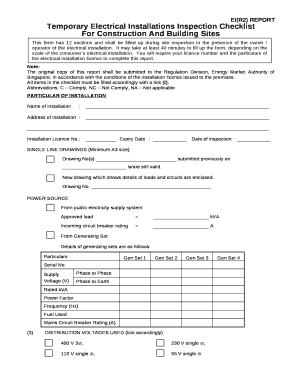
The Eir2 Form is essential for documenting the inspection of temporary electrical installations at construction and building sites. This guide will provide clear and supportive instructions on how to complete the form online, ensuring you have all necessary details at hand.
Follow the steps to complete the form accurately.
- Click ‘Get Form’ button to obtain the form and open it for editing.
- Begin by filling out the particulars of the installation section. Provide the name and address of the electrical installation, along with the installation license number, its expiry date, and the date of inspection.
- For the single line drawings section, specify the drawing numbers submitted previously, along with the date of submission. If there are new drawings showing the details of loads and circuits, list those drawing numbers.
- In the power source section, indicate whether the power source is from the public electricity supply system or a generating set. Enter the approved load and incoming circuit breaker rating as required.
- Tick the appropriate boxes under distribution voltages used to indicate the voltage levels applicable to the installation.
- Proceed to fill in the earthing arrangements and ensure each item is marked as compliant, non-compliant, or not applicable as appropriate.
- Complete the generating set section by confirming that all safety measures and installation requirements are met.
- Fill out the mains incoming supply and earth leakage protection section, ensuring to provide compliance details for each requirement listed.
- Continue to the distribution board section, confirming all equipment is installed correctly and meets required standards.
- In the final circuits section, ensure that all necessary safety measures are in place and mark compliance accordingly.
- Complete the socket-outlet assembly section by providing details on the assembly's installation and earthing.
- Describe the environmental conditions of the switchroom, affirming that it is in proper condition for operation.
- In the general observations section, add any additional comments or observations related to the inspection.
- Finally, provide your declaration as a licensed electrical worker, including your name, license number, and signature. Ensure the inspection is witnessed by the owner or operator of the installation.
- Once all fields are completed, save any changes made to the form. You can then download, print, or share the form as needed.
Complete your Eir2 Form online today and ensure your electrical installations are inspected and documented accurately.
Industry-leading security and compliance
US Legal Forms protects your data by complying with industry-specific security standards.
-
In businnes since 199725+ years providing professional legal documents.
-
Accredited businessGuarantees that a business meets BBB accreditation standards in the US and Canada.
-
Secured by BraintreeValidated Level 1 PCI DSS compliant payment gateway that accepts most major credit and debit card brands from across the globe.