Loading
Get Va Licensed Registered And Certified Providers Quick Start Guide 2007-2026
How it works
-

Open form follow the instructions
-

Easily sign the form with your finger
-

Send filled & signed form or save
How to fill out the VA Licensed Registered And Certified Providers Quick Start Guide online
This guide provides essential instructions for users on how to effectively complete the VA Licensed Registered And Certified Providers Quick Start Guide online. Whether you are a seasoned professional or new to the credentialing process, this resource will assist you in navigating each section with confidence.
Follow the steps to complete your application accurately and efficiently.
- Click the ‘Get Form’ button to acquire the form and open it in your preferred web browser.
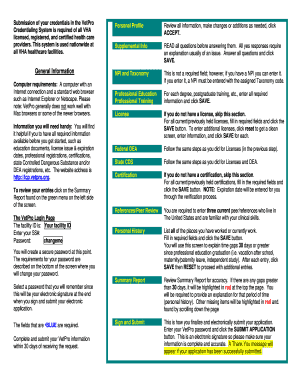
- Review your personal profile. Ensure all information is accurate and make any necessary changes or additions, then click ACCEPT.
- Navigate to the supplemental information section. Carefully read all questions before responding. Provide explanations for any 'yes' answers and click SAVE to proceed.
- For NPI and taxonomy, while not mandatory, if you have an NPI, enter it along with the respective Taxonomy code. Ensure your computer meets the required specifications for optimal performance.
- In the professional education and training section, input the required information for each of your educational achievements and click SAVE.
- Gather the necessary information regarding your licenses. Complete the fields for all active or past licenses, and click SAVE. To add more licenses, click RESET to clear the screen and then enter the new information.
- Complete the federal DEA section using the same procedure as the license section.
- For state CDS, replicate the steps taken for licenses.
- If applicable, fill out the certification section, inputting required details and clicking SAVE. Note that the expiration date will be automatically populated during verification.
- References and peer review require you to enter three current peers or references residing in the United States who can attest to your clinical skills.
- In the personal history section, record all your employment experiences, including any work gaps. After filling in the details, click SAVE and then RESET for new entries.
- Review the summary report for accuracy, noting any highlighted gaps greater than 30 days that need explanations. Make necessary corrections.
- Finalize your application by entering your VetPro password and clicking the SUBMIT APPLICATION button. A confirmation message will appear once your submission is successful.
Complete your VA Licensed Registered And Certified Providers Quick Start Guide online today for efficient credentialing.
Or, call our general VA hotline at 800-827-1000, Monday through Friday, 8:00 a.m. to 9:00 p.m. ET to find out what your care options may be.