Loading
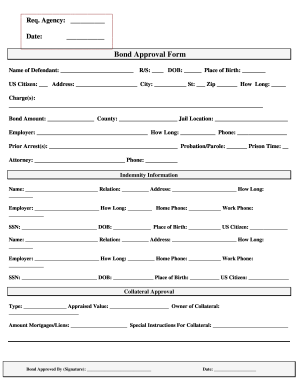
Get Fl Roche Surety Bond Approval Form 2010-2026
How it works
-

Open form follow the instructions
-

Easily sign the form with your finger
-

Send filled & signed form or save
How to fill out the FL Roche Surety Bond Approval Form online
Filling out the FL Roche Surety Bond Approval Form is a crucial step for individuals seeking bond approval. This guide provides clear, step-by-step instructions to help users navigate the online process with ease.
Follow the steps to complete the form effectively.
- Click ‘Get Form’ button to obtain the form and open it in the editor.
- Begin by entering the required details in the 'Req. Agency' section. This includes identifying the agency involved in the bond approval process.
- Fill in the date of completion in the designated area to keep records accurate.
- In the 'Name of Defendant' field, enter the full name of the individual seeking the bond approval.
- Provide the 'R/S' number, date of birth, and place of birth to verify the defendant's identity.
- Indicate whether the defendant is a US citizen and fill in their address, including city, state, and zip code. Additionally, specify how long they have resided at the given address.
- Detail the charge(s) filed against the defendant in the given space, ensuring clarity and completeness.
- Enter the bond amount requested, the county of jurisdiction, and the specific jail location.
- Fill in the employer information, including name, duration of employment, and contact phone number.
- Complete the section regarding prior arrests, probation or parole information, and any previous prison time.
- Input your attorney’s name and contact number for legal representation details.
- Proceed to the Indemnity Information section, including names, relations, addresses, employer details, and contact numbers for indemnitors.
- Insert SSNs, dates of birth, places of birth, and citizenship status for each indemnitor for verification purposes.
- In the Collateral Approval section, specify the type of collateral, appraised value, owner details, amount of any mortgages or liens, and any special instructions related to the collateral.
- Ensure that the form is signed by the authorized person approving the bond and date it accordingly.
- Once all required fields have been filled out and verified for accuracy, save changes, and choose to download, print, or share the completed form as needed.
Start completing your documents online today!
To fill it out correctly, though, you need to understand what's being asked. Name of the principal and surety. ... Amount of the bond. ... Statute or legal requirement. ... Cancellation clause. ... Aggregate liability clause. ... Bond number and effective date. ... Signatures. ... Some bonds can be issued immediately.