Loading
Get Fl Hsmv 82195 2019-2026
How it works
-

Open form follow the instructions
-

Easily sign the form with your finger
-

Send filled & signed form or save
How to fill out the FL HSMV 82195 online
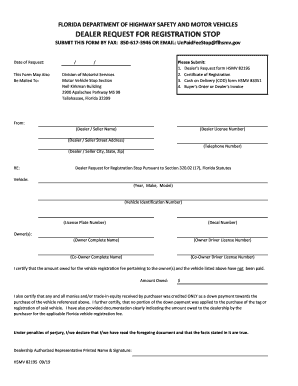
The FL HSMV 82195 form is essential for dealers to request a registration stop for vehicles in Florida. This guide provides a comprehensive overview of how to accurately complete the form online, ensuring that all necessary information is included.
Follow the steps to successfully complete the FL HSMV 82195 form.
- Click ‘Get Form’ button to access the FL HSMV 82195 form and open it in the editor.
- Enter the date of request in the designated field. This is important for supporting your submission timeline.
- Fill in the dealer's or seller's name, license number, street address, telephone number, and city, state, and zip code. Ensure that all information is accurate to avoid processing delays.
- Complete the vehicle information section by entering the year, make, and model of the vehicle, along with the vehicle identification number, license plate number, and decal number.
- For owner(s), provide the complete name and driver license number for each owner. If there are co-owners, be sure to include their details as well.
- Indicate the amount owed for the vehicle registration fee in the specified field. This is crucial for the dealer's request.
- Carefully read and check the certification statements regarding the payment and documentation about the amount owed. Your signature and printed name must be included to validate the request.
- Once all sections are filled out accurately, save the changes. You can then download, print, or share the completed form as needed.
Complete your FL HSMV 82195 form online today to ensure a smooth registration process.
Ten (10) day temporary license plates may be issued under the following circumstances: When a motor vehicle is required to be weighed for registration purposes.