Loading
Get Id Cao Udpi 8-1 2016-2026
How it works
-

Open form follow the instructions
-

Easily sign the form with your finger
-

Send filled & signed form or save
How to fill out the ID CAO UDPi 8-1 online
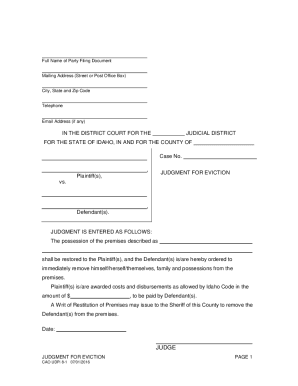
The ID CAO UDPi 8-1 form is used for filing a judgment for eviction in Idaho's district courts. This guide provides detailed instructions to assist users in navigating and completing the form online with ease.
Follow the steps to complete the ID CAO UDPi 8-1 form online.
- Click the ‘Get Form’ button to access the online form. This will open the ID CAO UDPi 8-1 in your chosen online editor.
- Begin by entering the full name of the party filing the document in the designated field. This should be the individual or entity initiating the eviction process.
- Fill in the mailing address, including street or post office box, city, state, and zip code in the corresponding fields. Ensure the information is accurate to facilitate communication.
- Provide a telephone number where you can be reached. This enhances accessibility for court communications.
- If applicable, include an email address in the designated field. This will allow for further electronic communications regarding the case.
- In the section labeled 'IN THE DISTRICT COURT FOR THE,' select your judicial district and fill in the name of the county where the eviction is taking place.
- Enter the case number assigned to your eviction case in the appropriate field. This information is usually provided at the time of filing.
- List the plaintiff(s) and defendant(s) in the specified areas, ensuring that their names are clearly stated to avoid confusion.
- Detail the judgment regarding possession of the premises, clearly stating the premises address and any other relevant information.
- Indicate the costs and disbursements awarded to the plaintiff(s) as allowed by Idaho Code, filling in the amount in the designated space.
- Complete the date field and sign your name in the 'JUDGE' section. If applicable, include the judge's name.
- In the Clerk's Certificate of Service section, include the date you served a copy of the judgment and name all parties involved alongside their mailing addresses.
- Select the method of delivery used to serve the documents, checking the applicable box, and provide any necessary contact numbers.
- Finally, review the entire form for accuracy and completeness. Save your changes, and then download, print, or share the form as required.
Complete your ID CAO UDPi 8-1 form online today for a smooth filing process.