Loading
Get Ca Ld-0274 2017-2026
How it works
-

Open form follow the instructions
-

Easily sign the form with your finger
-

Send filled & signed form or save
How to fill out the CA LD-0274 online
Filing a claim against the California Department of Transportation can be a straightforward process with the right guidance. This guide provides detailed instructions to help users fill out the CA LD-0274 form accurately and efficiently.
Follow the steps to complete the CA LD-0274 form online.
- Press the ‘Get Form’ button to access the CA LD-0274 form and open it in your preferred editing program.
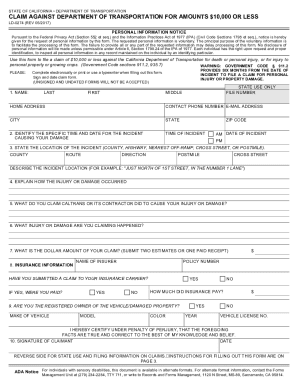
- Enter your personal information, including your full name, home address, contact phone number, and email address in the designated fields.
- Provide the specific date and time of the incident that caused your damage. Ensure that the date format is correct (MM/DD/YYYY) and specify whether it occurred in the AM or PM.
- Indicate the exact location of the incident by stating the county, highway number, and any relevant landmarks or cross-streets that will help identify the site.
- Describe in detail how the injury or damage occurred, providing any pertinent facts that relate to the incident.
- Explain what actions you believe Caltrans or its contractor took that contributed to your injury or damage. Be as specific as possible.
- List the injuries or damages you are claiming in detail, ensuring to include all relevant aspects.
- Fill in the total dollar amount of your claim. Submit either two estimates or one paid receipt as documentation of the damages claimed.
- Provide your insurance information, including the name of your insurer and policy number. Indicate whether you submitted a claim to your insurance company and if you received payment.
- Indicate if you are the registered owner of the vehicle or damaged property, and provide the relevant vehicle details.
- Sign and date the claim form. Remember, unsigned and undated forms cannot be processed.
- Finally, save the changes to your form. After completing the form, you can download, print, or share it as needed, and be sure to send it to the correct District Claims Office.
Complete your documents online and ensure a smooth filing process.