Loading
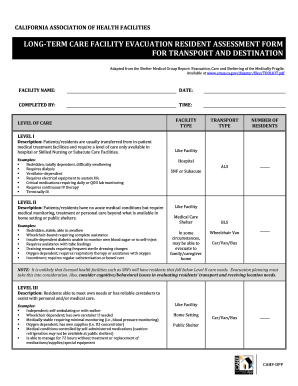
Get Ca Cahf Long-term Care Facility Evacuation Resident Assessment Form
How it works
-

Open form follow the instructions
-

Easily sign the form with your finger
-

Send filled & signed form or save
How to fill out the CA CAHF Long-Term Care Facility Evacuation Resident Assessment Form online
The CA CAHF Long-Term Care Facility Evacuation Resident Assessment Form is essential for coordinating the safe evacuation of residents in long-term care facilities. This guide provides a step-by-step approach to completing this form online, ensuring that all necessary information is accurately captured for effective planning.
Follow the steps to complete the assessment form online.
- Click ‘Get Form’ button to obtain the form and open it in the editor.
- Begin by entering the facility name in the designated field. Ensure the name is correct to avoid confusion during the evacuation process.
- Next, input the current date in the appropriate format. This date is important for record-keeping and planning.
- Fill in your name in the 'completed by' section to identify who is responsible for the assessment.
- Record the time of completion, which is essential for tracking the timing of the assessment.
- Select the level of care required by the residents. Review the descriptions provided for Levels I, II, and III to determine the appropriate category for each resident.
- Indicate the facility type that best represents your establishment, such as a skilled nursing facility or hospital.
- Document the type of transport planned for evacuation to ensure that all residents can be accommodated based on their specific needs.
- Note the total number of residents who will be evacuated, as this information is critical for logistics and coordination.
- Before finalizing the form, review all entries for accuracy. Once confirmed, proceed to save changes, download, print, or share the completed document as necessary.
Complete your forms online to ensure efficiency and preparedness.