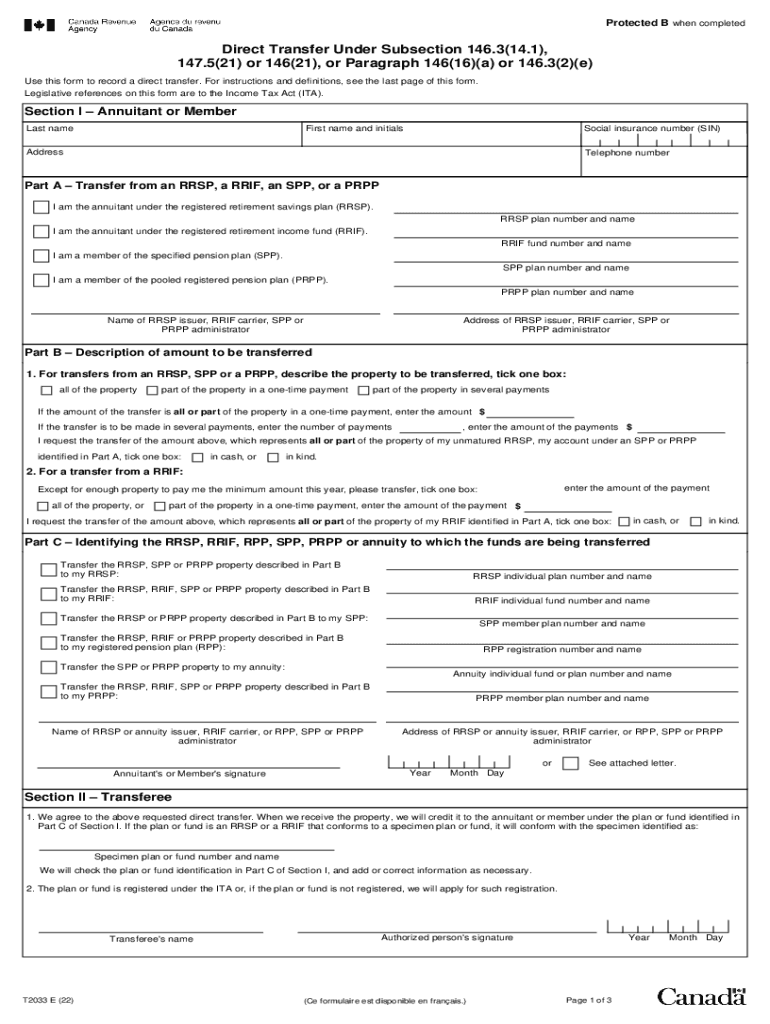
Protected B when completedDirect Transfer Under Subsection 146.3(14.1), 147.5(21) or 146(21), or Paragraph 146(16)(a) or 146.3(2)(e) Use this form to record a direct transfer. For instructions and.

Open form follow the instructions

Easily sign the form with your finger

Send filled & signed form or save
How to fill out the Canada T2033 E online
The Canada T2033 E form is essential for recording a direct transfer of retirement funds under various sections of the Income Tax Act. This guide provides clear and supportive instructions on how to complete the form online efficiently.
Follow the steps to accurately complete the Canada T2033 E form online.
- Click ‘Get Form’ button to obtain the form and open it in the editor.
- Complete Section I, which requires entering the details of the annuitant or member. This includes the last name, first name, social insurance number, address, and telephone number.
- In Part A, indicate the type of account from which you are transferring funds: RRSP, RRIF, SPP, or PRPP. Fill in the respective plan number and name.
- Move to Part B and select how much you are transferring. Describe whether you are transferring all, part in a one-time payment, or part in several payments. Provide corresponding amounts as necessary.
- Continue to Part C and identify the account to which the funds are being transferred. Provide the necessary details including the plan number and the name of the new issuer.
- Review your information for accuracy. Ensure all sections are filled out completely to prevent processing delays.
- Once you have completed the form, you can save your changes, download a copy for your records, print it, or share it as required.
Start completing your T2033 E form online to ensure a smooth and efficient transfer process.
Experience a faster way to fill out and sign forms on the web. Access the most extensive library of templates available.
Related content
T1T2LEGISLATIVET4LEGISLATIVE MANAGEMENTT5Personal Services41,791,059
Legislative references on this form are to the Income Tax Act. Area I – Annuitant Last...
Did you know you can complete this form online with e-access? ... to pay for all or part...
Get answers to your most pressing questions about US Legal Forms API.
What is the difference between T2033 and T2030?
What is the Difference Between T2030 and T2033? Form T2030 is different from form T2033 as it details only direct transfers that need to be taxed. When you use form T2030 you are transferring money ing to the rules listed under subparagraph 60(I)(v) of the Income Tax Act.
What is the direct transfer form for RRSP?
You can use Form T2220, Transfer from an RRSP, RRIF, PRPP or SPP to Another RRSP, RRIF, PRPP or SPP on Breakdown of Marriage or Common-law Partnership for transfers to a RRIF or an SPP transfer. For transfers to an RRSP, Form T2220 must be filled out. Do not send us a copy of the form.
What is a 146.16 transfer?
You can use this form to record a direct transfer, under paragraph 146(16)(a), of all or part of the property of the plan to: the issuer of another RRSP having the same annuitant; the carrier of a RRIF having the same annuitant; or the administrator of a registered pension plan (RPP), for credit to the account of the ...
How do I get a T2033 form?
T2033 Transfer Form Download The T2033. Download pdf file: T2033. 9 Step Process. Learn how to fill in a T2033 transfer form in 9 simple steps outlined below. Download a Copy of a T2033. ... Print the 5 pages of the T2033. ... Complete Page 1, Area 1 by the Annuitant. ... Complete, Area 1 - Annuitant. ... Complete Part A. ... Complete Part B.
What is a T2033 registered transfer form?
What is a T2033 (CRA form T2033) ? This exciting number is the name of a transfer form you need to fill out to transfer RRSP funds between two institutions (say, you're changing stockbrokers, or you want to move your GIC to a mutual fund at a new company) without having to deregister the funds.
Does Revenue Canada send e-transfers?
Sample 1. The Canada Revenue Agency (CRA) will never send or request e-transfers of any kind. The CRA will only send you payments by direct deposit or by cheque in the mail.
What is a T2033 transfer?
What is a T2033 Form Direct Transfer Used For? This form covers almost all transfers between two registered savings or retirement accounts, including transfers made due to marriage breakdown or for non-residents. Here is a list of the situations where you may use a T2033 form. Direct Transfer Payments.
Use professional pre-built templates to fill in and sign documents online faster. Get access to thousands of forms.
If you believe that this page should be taken down, please follow our DMCA take down process here.